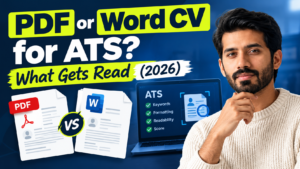

Search for “PDF or Word CV” and you’ll land on guides that flatly contradict each other. One says PDF is the only safe choice. The next says use Word when in doubt. A UK recruiter says send Word, no discussion.
For this guide I compared the top-ranking articles, read Greenhouse’s own documentation on what its parser can’t handle, and went through upload-limit data for seven applicant tracking systems, including Personio and Softgarden (both German) and Recruitee (Dutch). What came out is less dramatic than the headlines: the file extension matters less than what’s inside the file, and the right answer depends on who opens it first.
Quick answer: if the employer names a format, use that one. If not, send a text-based, single-column PDF under 2 MB to portals and hiring managers, and a .docx to recruitment agencies. Never send a scanned or photographed CV.
Why the top guides disagree about PDF or Word CVs
Here is what the first page of results actually says:
- Jobscan (updated July 2026): convert to PDF unless the posting asks for .docx. It says its own tests found PDFs parsed more accurately, but the article doesn’t publish the results.
- iHire: Word is the preferred format for ATS because it’s easier to parse, so use .docx when unsure.
- Resume Mentor: PDF almost every time.
- Investigo, a UK recruiter: in its LinkedIn poll 73% preferred PDF and 27% Word. It suggests keeping a Word copy for agencies and older systems.
- Recruitment firms like People with Energy and Ten-Percent Legal Recruitment: send Word, because they edit CVs, remove contact details and add their own branding before passing you on.
The split isn’t random. Advice from CV-scanner and template companies leans PDF. Advice from recruiters who rework your file leans Word. They’re answering different questions: will the software read it, and can the person editing it work with it? Hardly anyone separates the two, so you get a tie.
There’s a second problem: nobody shows their working. Jobscan mentions tests without results, and other guides quote accuracy percentages with no method behind them. I’ve left those numbers out. Everything numeric below comes from vendor documentation or from a test you can repeat yourself.
What an ATS actually does with your file
An applicant tracking system doesn’t read your CV the way a person does. A parser pulls the text out of the file, works out which lines are your name, jobs, dates and skills, and fills a candidate record. The file format only affects the first step, text extraction. Everything after that depends on your layout.
Greenhouse is unusually open about where this goes wrong. Its support page on unsuccessful resume parses lists files over 2.5 MB, text with spaces between the letters, graphics and photos, CVs uploaded as images, tables, headers and footers, contact details inside a header or text box, columned layouts, unclear sections, and abbreviated job titles such as “Sr. Account Exec”. Notice what isn’t listed as a cause: PDF or Word.
Two details that are easy to miss:
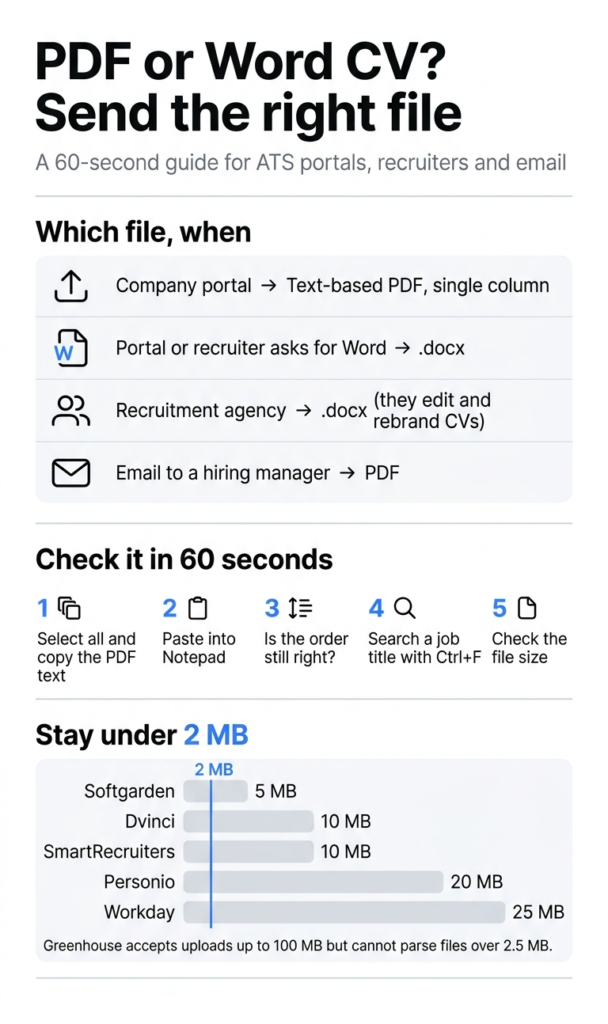
- Greenhouse accepts uploads up to 100 MB but can’t parse a resume over 2.5 MB. Both figures are in its documentation, in different articles.
- A failed parse isn’t a rejection. According to Greenhouse, the file simply gets attached to the candidate record and someone fills in the fields by hand. You lose the auto-filled fields, but the recruiter can still open your CV.
Parsers are also better than the folklore suggests. Enhancv argues that the strongest parsers, Textkernel’s among them, now handle two columns cleanly, and that the real trouble comes from older configurations. The catch is that you can’t see which parser or setup your target employer runs. Textkernel’s documentation lists OCR for scanned files as an optional add-on, so an image-only CV may come out as a blank page. I’d plan for the cautious setup. How employers may layer AI on top of parsing is a separate question, which I covered in my EU AI Act guide.
Every ATS accepts PDF and Word, so check the size limit instead
Kombo, which builds integrations between HR systems, published an attachment analysis of seven ATS platforms. All seven accept .pdf, .doc, .docx and .txt for CVs, so “will they take my file?” is the wrong worry. The upload ceilings differ a lot:
ATS | Max CV size in Kombo’s tests |
|---|---|
Softgarden | 5 MB |
Dvinci | 10 MB |
SmartRecruiters | 10 MB |
Personio | 20 MB |
Workday | 25 MB |
Recruitee | Over 50 MB |
Greenhouse | Over 50 MB (100 MB per Greenhouse) |
Two cautions. These figures describe what each system accepted through Kombo’s integrations, so an employer’s own career page can be stricter. And Softgarden doesn’t accept PNG or JPEG as a CV, so sending a photo of your CV fails there.
My working rule is 2 MB: under Greenhouse’s parsing ceiling, matching the figure many guides report for LinkedIn Easy Apply, and far below the strictest limit in the table. In my CV file size guide I noted that a one-page text CV usually sits between 80 and 400 KB, so if yours is several megabytes, an oversized photo is almost always the cause. Shrink the picture with the Image Compressor before it goes into the document, then squeeze the finished file with the PDF Compressor if you still need to.
PDF vs Word: the differences that actually matter
| Text-based PDF | .docx |
|---|---|---|
Layout | Fixed, same on every device | Can shift between Word versions and viewers |
Parsing | Fine when the text is real text; fails if it’s an image | Fine when simple; tables and headers can trip basic extractors |
Recruiter edits | Awkward | Easy, which is why agencies ask for it |
Hidden details | Author and title can travel into the PDF | Author and other properties travel with the file |
Best for | Portals, email to a hiring manager | Agencies, “Word only” requests |
Two gotchas worth knowing. First, Word’s PDF export has an option called “Bitmap text when fonts may not be embedded”. If a font can’t be embedded, the PDF falls back to pictures of the text. Stick to standard fonts and run the test below instead of assuming it worked. Second, Microsoft’s Document Inspector can find the author name and other hidden data in a Word file, and under Save As → Options the “Document properties” box decides whether those details are copied into the PDF. If you’d rather not send them, untick it. My walkthrough on saving a Word document as a PDF covers the export itself.
Test your own CV in 60 seconds
Run this on the exact file you plan to send:
- Open the PDF, select everything (Ctrl+A or Cmd+A), copy, and paste into Notepad or TextEdit. Nothing pastes, or it’s gibberish? The text is an image or the font encoding is broken.
- Read the pasted text top to bottom. Is your name and email near the top? Does each job keep its own dates and bullets? If lines from two columns are mixed together, a basic extractor will mix them too.
- Press Ctrl+F or Cmd+F and search for a job title from your CV. No hit means no text layer.
- Check the file size. Under 2 MB, as above.
- Run it through the ATS Resume Checker. It accepts PDF, PNG, JPG and WEBP uploads, not .docx, so export a Word CV to PDF first.
Put Image 3, your own screenshot of the copy-and-paste test, here.
What this looks like. For this guide I built one dummy CV three ways and ran generic extraction tools over it (poppler’s pdftotext and Python’s python-docx). They aren’t an ATS, but they show what plain text extraction does with different layouts.
- Single-column PDF: perfect reading order.
- Two-column table with the contact line in the header: the columns came out interleaved, with “EDUCATION” landing between two experience bullets:
SKILLS
EXPERIENCE
Salesforce
Senior Account Manager, Acme GmbH (20212025)
Negotiation
Forecasting
Managed 40 key accounts and grew revenue
by 18%
EDUCATION
Led a team of 4 junior managers- The same table layout as a .docx: a simple paragraph extractor found nothing at all, because everything sat inside a table and a header.
- Image-only PDF: zero characters.
Which CV file to send, by situation
Situation | Send | Why |
|---|---|---|
Company portal that accepts PDF and DOCX | Text-based PDF, single column | Layout stays fixed and every system above accepts it |
Portal or recruiter asks for Word | .docx | Follow the instruction |
Portal fills your details in wrongly from the PDF | Try a .docx of the same simple layout | A different extraction path can read it better |
Email to a hiring manager | Looks identical on any device | |
Recruitment agency | .docx | They edit, rebrand and strip contact details |
LinkedIn Easy Apply | PDF or .docx under 2 MB | LinkedIn accepts both |
If the portal pre-fills the application form from your upload, treat that form as a free parser test: wrong or missing fields mean the parser struggled with your file.
Layout rules that matter more than the file extension
- One column. Skip tables, text boxes, icons and skill bars.
- Put your name, email and phone in the body, not the header or footer. Greenhouse lists that as a parsing failure.
- Use ordinary headings: Experience, Education, Skills.
- Write job titles out in full and keep every date in one format.
- Stay with standard fonts and no letter-spacing tricks.
- Think before adding a photo; I explain the ATS side in CV photo and ATS.
- Using a Europass template? Read this first.
Convert and share without handing your CV to strangers
Your CV is personal data: name, phone, address, work history. When you need a PDF, export it from Word or Google Docs instead of pasting it into an online converter that uploads the file. I wrote about the GDPR side in online file converter privacy. If you do need a tool, pick one that works inside the browser. The PDF Compressor and Merge & Split PDF on this site run in your browser tab, so the file never leaves your device. Handy when your certificates are bundled into the same file as your CV and you want to pull them out before applying.
Frequently Asked Questions
Can an ATS read PDF files?
Yes, when the PDF contains real text. All seven systems in Kombo’s table accept PDF. The risks are image-only PDFs and complicated layouts, not the format itself.
Is a Word CV better for ATS?
Not by default. Some older systems and agency workflows suit .docx better, so test both if a portal scrambles your PDF.
What if the job ad doesn’t name a format?
Send a PDF to portals and hiring managers, and a Word file to recruitment agencies.
Should I upload a scan or a photo of my CV?
No. Parsing needs a text layer, and OCR is an optional extra that an employer may not have switched on.
Are Canva and Europass PDFs safe for ATS?
They can be, if the export keeps real text and the layout stays simple. Sidebars, icons and text boxes cause reading-order problems, so run the 60-second test. More in my Europass and ATS guide.