You finish the application, attach your CV, hit submit, and the portal throws back “file exceeds the maximum size allowed.” No number, no explanation. Just a red banner and a CV that is apparently, mysteriously, too big.
I see this constantly. Building the PDF Compressor on this site meant testing it against real CVs people sent in, and the pattern was almost always the same: it’s never the wording that makes a CV huge. It’s what’s sitting inside the file without anyone noticing — a scanned certificate saved at print resolution, a profile photo exported straight off a phone at 4000 pixels wide, or a Europass-style template carrying embedded fonts and table graphics nobody ever looks at until the upload fails.
Why your CV balloons in size without you doing anything wrong
A one-page CV written in Word or Google Docs and exported as PDF should sit somewhere between 80KB and 400KB. If yours is sitting at 3MB, 5MB or more, it’s almost always one of these:
- A headshot or photo pasted in at full camera resolution instead of resized first
- A scanned diploma, reference letter or certificate, since scans are images and images are heavy
- A template (Europass is a repeat offender) that renders sections as tables and embeds its own fonts
- Several export/save cycles in Word, which tends to keep old embedded data around instead of clearing it out
None of this shows up when you look at the CV on your screen. It only shows up as a file size, and then as a rejected upload.
What job portals across Europe actually accept
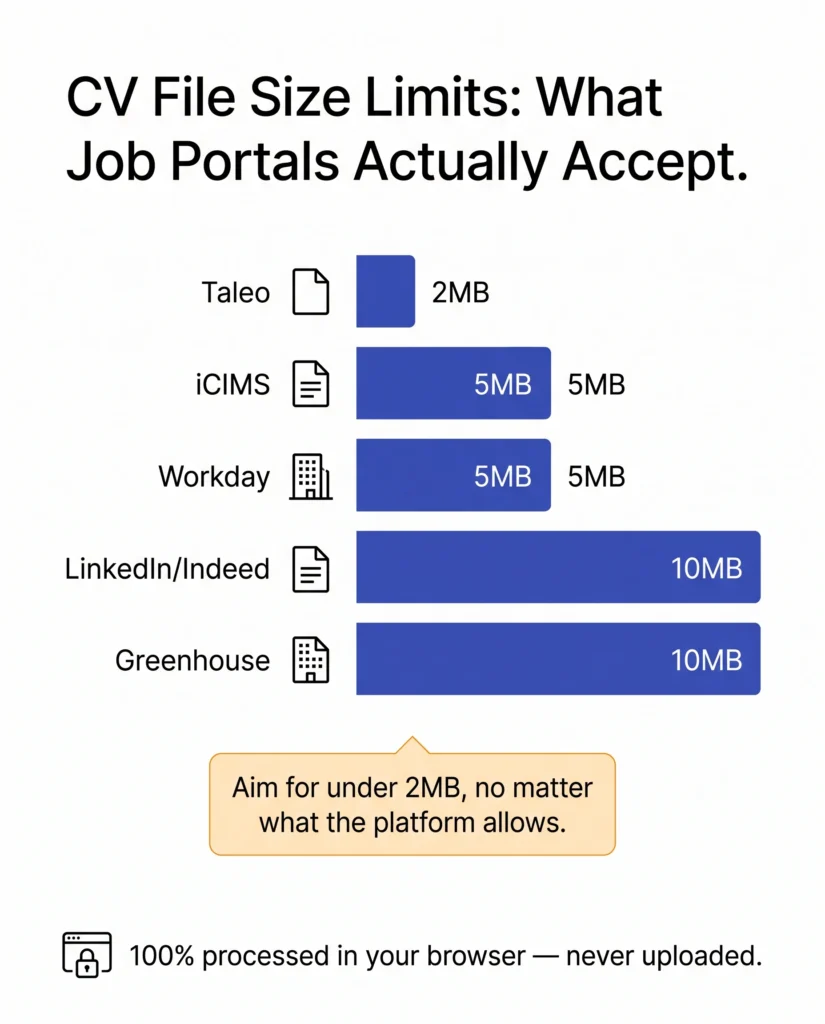
Every platform sets its own ceiling, and it’s rarely printed anywhere obvious on the application form itself. Based on what’s publicly documented by the platforms and the career sites built on them, here’s roughly where the limits sit:
What job portals across Europe actually accept
Every platform sets its own ceiling, and it’s rarely printed anywhere obvious on the application form itself. Based on what’s publicly documented by the platforms and the career sites built on them, here’s roughly where the limits sit:
| Platform | Typical CV/resume upload limit |
|---|---|
| Taleo | ~2 MB |
| iCIMS | 1–5 MB, set per employer |
| Workday | ~5 MB |
| LinkedIn / Indeed | 2–10 MB, varies by upload path |
| Greenhouse | ~10 MB |
Workday, Taleo and SuccessFactors show up constantly on the career pages of companies hiring across the EU and UK, so this isn’t only a US-portal problem. If you’re applying anywhere in Europe through a corporate careers page rather than emailing a recruiter directly, there’s a real chance one of these is running underneath it. Treat 2MB as your actual target rather than whatever maximum the platform states. A file that technically fits can still get flagged if it’s right on the edge, and a smaller file uploads faster on a slow connection, which matters more than people think when you’re applying from a phone between things.
The fix, without handing your CV to a random server
This is what the PDF Compressor on this site is actually built for. Drop your CV in and it re-processes the file entirely inside your browser tab. Nothing gets sent off to be compressed somewhere else and sent back.
A few things that actually move the needle:
- If your CV has a photo, resize the image itself to something reasonable, around 400×500px, before it goes into the document. Compressing after the fact can only do so much with an oversized image already embedded.
- Export from Word or Docs as PDF rather than “print to PDF,” which tends to carry over more clutter.
- If your CV, cover letter and certificates got bundled into one large file, it’s often faster to split the extras out than to compress everything as one lump.
- Run the result through the compressor and check it against the actual number for the platform you’re applying to, not just “smaller than before.”
Most CVs go from 3–4MB down to under 500KB this way with no visible loss in quality, because nearly all of that weight was sitting in one oversized image, not in the text.
Why where you compress it actually matters
Here’s the part most guides on this topic skip. Your CV is personal data: full name, address, phone number, work history, sometimes a photo. Under GDPR, that’s exactly the kind of information that’s supposed to move around carefully. Most free “compress my PDF” tools work by uploading your file to their own server, compressing it there, and sending it back.
That’s a reasonable way to handle a random PDF. It’s a stranger thing to do with a document that has your home address on it, especially with no idea which country that server is sitting in. If it’s outside the EU/EEA, compressing your CV can technically count as a cross-border transfer of personal data, which is a strange side effect of trying to fix a file size error.
It’s the same reasoning behind why merging a PDF online raises its own privacy questions: the risk was never really the file format, it’s what happens to a copy of your document once it leaves your device. A tool that never uploads the file in the first place sidesteps that question entirely.
Two more things worth checking while you’re at it
If your CV includes a photo, standard on a lot of European CVs and less common on UK ones, make sure it’s actually sized correctly rather than crammed in at whatever resolution your phone shot it at. Here’s the exact sizing most European employers expect.
And if you’re using a Europass template specifically, it’s worth knowing it doesn’t always parse cleanly through applicant tracking software, even once the file size is sorted. The same tables and layout choices that bulk up the file can also scramble how an ATS reads it.
Once the file size is fixed, it’s worth running the finished PDF through the ATS Resume Checker too, just to rule out anything else quietly working against you before you hit submit again.