

Image Compressor
Drag and Drop File Here
or click anywhere to browse
Image Queue
READY TO PROCESS
Compress any image Format Here
Now you can compress any image format here. There is no need to swtich multple web tools for different formats. Also compress PNGs with transparent background. Fast processing because your files are not going outside of your computer to any server they stay in your computer. And best parts its free and you can use it for unlimited time for unlimited files. Without any signup or watermark.
Key Features That Make a Difference
The VinlyeePro Image Compressor is packed with features that prioritize user experience, privacy, and performance.
Nothing Ever Leaves Your Device
Every image is compressed locally, in your own browser. There’s no server processing it in the background and no risk of a stranger’s cloud storage holding onto your photos.
A Quality Slider You Can Actually Judge By
Drag it down for a smaller file, up for more detail, and see the before-and-after size for each image as you go — no guessing whether 60% quality is going to look rough.
Batch Process the Whole Folder
Drop in a dozen photos at once instead of compressing them one at a time. Handy for clearing out a camera roll or prepping a set of product shots.
Covers the Formats You Actually Use
JPEG, PNG with transparency intact, WebP, HEIC straight off an iPhone, and GIF — so you’re not switching tools depending on what your camera or phone exported.
Free, No Watermark, No Catch
Compress ten images or ten thousand — same result, no account required, nothing added to your photos that wasn’t there before.
JPEG | PNG (with transparency) | WebP | HEIC (High-Efficiency Image Container) | GIF
How to Compress Your Images
The tool is designed for speed and simplicity. You can start compressing your images in just a few seconds with a simple drag-and-drop interface.
Step 1: Add Your Images
You have two easy ways to add your images. First, you can simply drag and drop one or multiple images directly onto the designated area. If you prefer, you can click the browse button to open your file explorer and select as many images as you need. The tool is built to handle batch processing, so you can compress numerous files at once, saving you valuable time.

Step 2: Configure and Compress
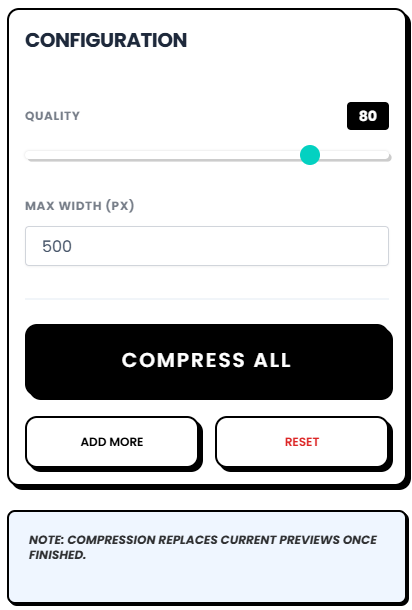
Once your images are loaded, head over to the configuration tab. Here, you have control over the compression settings. You can adjust a quality slider to find the perfect balance between file size and image clarity. When you are happy with your settings, just click the “Compress” button. The tool will quickly process all your images according to your preferences.
Your Go-To Image Optimization Tool
The VinlyeePro Image Compressor offers a fast, secure, and user-friendly solution to reduce file size jpg images and streamline your workflow. Whether you’re searching for the best photo compression app for iPhone, need to know how to compress jpeg file size for easier sharing, or want full control over your image quality, this tool has you covered. With its offline capabilities, batch processing, and detailed controls, it gives you everything you need to optimize your images efficiently. Because it is completely free and respects your privacy, you can use it with confidence for any project. Give it a try and see how easy it is to make your images lighter, faster, and perfectly suited for your needs.