
PDF Compressor
Compress PDF
compress multiple pdfs with your own desire size
Queue (0)
How to Compress PDF Files
You don’t need any technical skills to get your files optimized. Here is the exact step-by-step process on how to compress your files in seconds:
Shrinks the File, Not the Readability
Compression targets the actual bloat — oversized embedded images, redundant data — rather than blurring text or making pages hard to read.
Built for the “Too Large to Send” Problem
Most inboxes cap attachments around 25MB, and plenty of application portals cap them lower still. This gets a file back under that line without you guessing at settings.
Choose How Hard to Compress
Light compression for something you’ll print, heavier compression for a file that just needs to squeeze through an upload form — your call.
Stays on Your Device, Start to Finish
Whatever’s inside the PDF — contracts, transcripts, scanned IDs — never gets uploaded to a server to be compressed.
Works on PDFs From Anywhere
Scanned documents, exported Word files, downloaded forms — if it opens as a PDF, this will generally compress it.
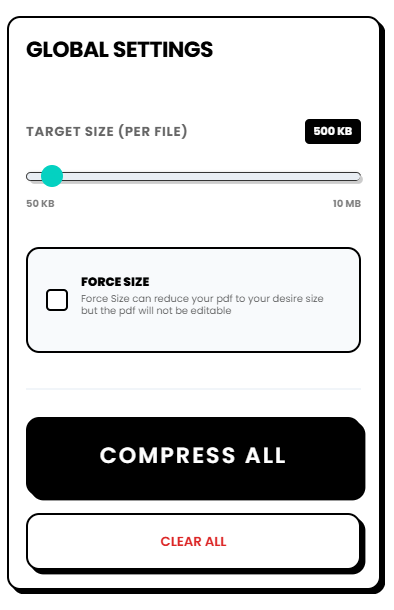
Set Your Target Size: Use the built-in slider or input field to tell the tool exactly how small you need the final document to be. You have total control over the compression ratio.
Features That Make This the Best PDF Compressor
When comparing this to other premium software or sketchy online converters, I found that keeping things simple and unrestricted provides the best user experience. Here is what sets this web tool apart:
No Server Uploads: Complete data privacy. Your files are processed locally on your machine.
Bulk Processing at Once: Don’t waste time doing one file at a time. Upload an entire folder of PDFs and shrink them simultaneously.
Zero Limits: There are absolutely no daily limits on how many files you can process or how large the original files are. Compress 5 files or 500—it handles it all.
No Sign-Up Required: You will never be asked to create an account, verify an email, or remember a password.
100% Free Forever: No paywalls, no hidden subscription fees, and no “premium” upgrades required to unlock basic features.
Custom Target Sizing: Instead of hoping the tool guesses the right size, you get to explicitly set your target file size before converting.
For a deeper understanding of how PDF files hold data and why they can become so large, you can read more about the technical specifications of the Portable Document Format on Wikipedia. Understanding how embedded fonts and high-resolution images bloat your files makes it even clearer why a dedicated compressor is so essential.
Frequently Asked Questions
Is this PDF compressor really free?
Yes, it is totally free. There are no subscriptions, no premium tiers, and no hidden fees. I highly recommend bookmarking it so you always have a free utility ready whenever you need it.
Are my documents safe? Will they be uploaded to the internet?
Your documents are 100% safe because they are never uploaded to the internet. This is a client-side tool, meaning all the compression happens locally inside your web browser. We do not have servers that store or read your files.
Can I compress multiple PDFs at the same time?
Absolutely. After you upload your first file, just click the “Add more files” button. You can queue up as many PDFs as you need and compress them all at once. I built this specifically to save you time.
Is there a limit to how many files I can compress per day?
No limits whatsoever. Unlike other tools that cap you at two or three conversions a day before asking for a credit card, you can use this tool as many times as you want, day or night.
Will I lose quality when I compress my PDF?
The tool uses smart compression algorithms to reduce the file size by optimizing embedded images and removing unnecessary metadata, while keeping the text and layout perfectly clear and readable. You get to set the target size, giving you the perfect balance between high quality and low file size.