
Independent rule-based estimate only — not a score from an employer or a specific ATS platform. Different employers configure screening differently.
as you fill in your details
Most resumes never reach a human.
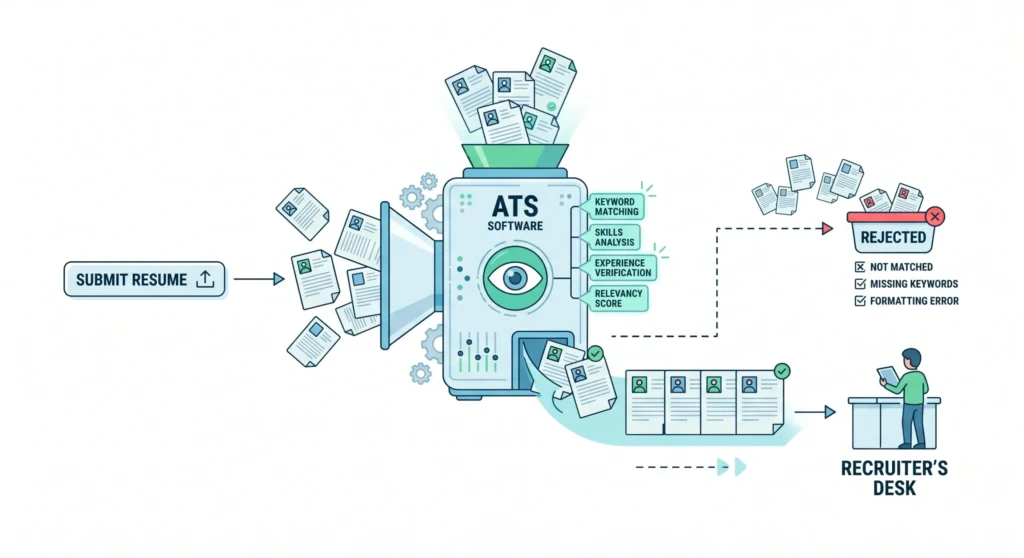
An Applicant Tracking System (ATS) is software that scans, ranks, and sorts resumes before a recruiter ever opens one.
ATS software looks for keywords, clean formatting, and clear structure — and files the rest away. That means a talented candidate with a poorly formatted resume can be rejected before a human ever sees it.
Your resume's success depends on how well it's optimized for the role, the template you use, and the keywords you've included.
Two tools. One clean pass.
Score what you already have, or build something that's ATS-ready from the first line.
ATS Score Analysis
Upload your resume and get a clear 0–100 score reflecting how well it aligns with ATS requirements.
- Missing keywords flagged
- Formatting issues caught
- Weak sections highlighted
- Concrete areas to improve
Resume Builder
Build a professional, ATS-friendly resume from scratch with structure recruiters and software both trust.
- Clean, ATS-readable formatting
- Proper section hierarchy
- Industry-standard templates
- Instant customization
How it works
Six steps, start to finish — from a rough draft to a resume ready to send.
Upload your resume
Optional — if you already have one, we pull the details out automatically. Or start from a blank slate.
Build your resume
Fill in your details section by section. The preview on the right updates as you type.
Choose a look
Pick a template and font. Classic, Modern, or Minimal — the preview updates instantly.
Check your ATS score
See exactly how your resume will perform in automated hiring systems, with a full breakdown.
Match a job description
Paste a job posting and see how well your resume matches — and what's missing.
Download
Your resume downloads exactly as shown in the preview, in your chosen template and font.
Rewrite your resume with AI
Pair the checker with ChatGPT or Gemini to use AI to improve wording, keyword alignment and clarity before submitting your resume.
Upload your old resume and it auto-fills straight into the ATS-approved builder, ready to refine.
About the checker
The ATS checker doesn't grade your data — it checks formatting and flags structural issues. Keywords and content are on you, since every job description is different.
Frequently asked questions
What is an ATS resume checker?+
A tool that analyzes your resume to see how well it performs in Applicant Tracking Systems — identifying missing keywords, formatting issues, and optimization gaps.
How do I check the ATS score of a resume?+
Upload it to an ATS checker like Vinlyee. It scans for keywords, formatting, and job relevance, then returns a score with improvement suggestions.
How do I know if a resume is ATS-friendly?+
Run it through an ATS checker. A resume is ATS-friendly when it has clean formatting, relevant keywords, clear sections, and no complex graphics or tables.
Is Vinlyee ATS Resume Checker free?+
Yes — completely free, with no signup and no subscription required.
Can an ATS read PDFs?+
Most modern ATS systems can. Stick to simple, text-based PDFs without complex layouts for the most accurate parsing.
Can I create a CV checklist?+
Yes — a good checklist covers contact details, skills, experience, keywords, and formatting, and helps improve ATS performance directly.
Should I re-read my CV after writing it?+
Always. Checking for errors, clarity, and keyword optimization noticeably improves your chances with both ATS and recruiters.