

Tencent’s second-quarter results from August 2026 counted 1,439 million monthly users across Weixin and WeChat. Weixin is the China version of the app, and WeChat is the international one. Many of those users rely on one small square: the QR code in WeChat. To see your own code in October 2026, tap Me, then your profile photo, then My QR Code. To scan someone else’s code, tap the plus icon and choose Scan.
Those two taps solve the easy part. Real life gets messier. A group code dies after a week. A friend sends a code as a screenshot. A shop shows a payment code, and you have never paid this way.
This guide fixes those problems one by one. You will learn how to scan, share and protect a QR code in WeChat. You will see why group codes expire and how to stop that. You will also learn how WeChat Pay codes work for visitors to China. Each section starts with the problem, then gives the fix.
I checked the official WeChat Help Center, Tencent’s results and Chinese central bank news for this guide. Each key figure names its source and date.
Where Do I Find My QR Code in WeChat?
Open WeChat and tap Me. Tap your profile photo, then tap My QR Code. Your code appears on screen. Friends can scan it to add you. Use the options on that screen to save the image, share it or change its style.
How Do You Scan a QR Code in WeChat on iPhone or Android?
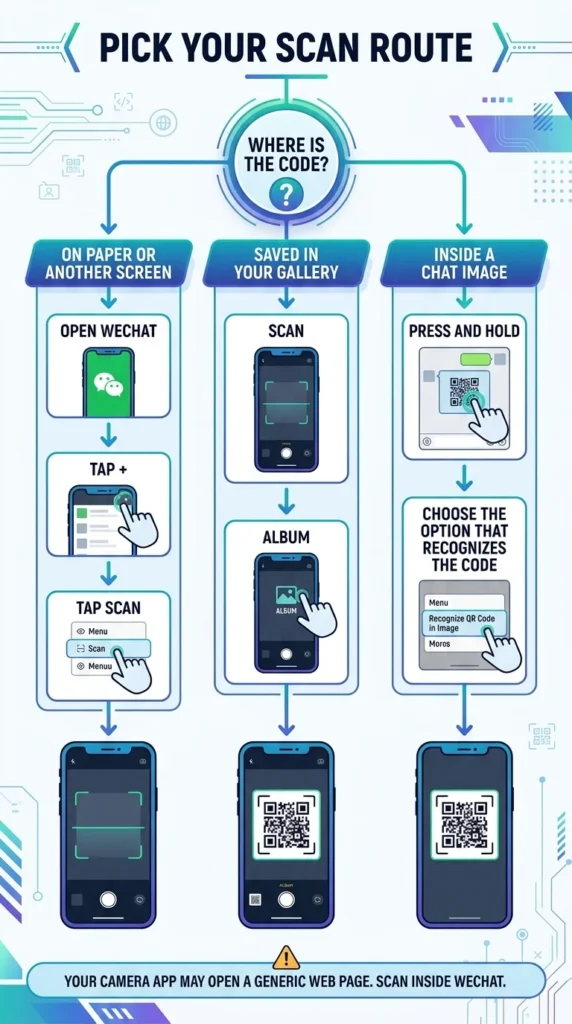
You point your phone at a WeChat code, and nothing useful happens. The camera app may open a web page instead of the profile or group you wanted. The fix is to scan inside WeChat.
Use the built-in WeChat scanner
The scanner inside the app handles personal, group, payment and Mini Program codes. A Mini Program is a small app that runs inside WeChat. Follow these steps:
- Open WeChat and tap the plus icon in the top right corner.
- Choose Scan.
- Hold your phone steady until the code sits inside the frame.
- Follow the prompt, such as adding a contact or joining a group.
Scan a code from a screenshot or photo
A friend sends a group code as a screenshot. You cannot point your camera at the screen you are holding.
Think about a student in Lyon whose flatmate shares a society’s group code on WhatsApp. The code and the scanner sit on the same phone. WeChat solves this. As of October 2026, Tencent’s developer documentation lists two image routes: pick a code from your album, or hold an image to recognize it.
Pick the code from your album
Save the screenshot to your gallery. Open Scan and tap Album. Choose the image. WeChat reads the code and shows the next step.
Long press the code inside a chat
Open the image in a chat and press and hold it. Choose the option that recognizes the QR code. This also works for Mini Program codes.
Will your phone camera work?
Sometimes. The camera app may read the code but land on a generic web page. The scanner inside WeChat gives the safest result.
How Do You Share Your Own QR Code in WeChat Without Risk?
You post your code on a public page, and strangers start adding you. A code works for anyone who sees it.
Almost every internet user in China chats online. The China Internet Network Information Center (CNNIC) published its 54th report in August 2024. It counted 1.078 billion instant messaging users, out of about 1.1 billion internet users. So a public QR code in WeChat can reach a crowd quickly.
Picture a freelance translator in Vienna who prints her code on a trade fair flyer. Within days, unknown people send friend requests. She wants control back.
Change the style, but keep it scannable
WeChat lets you change the style of your code on the My QR Code screen. Keep strong contrast between the dark squares and the background. Never recolor, stretch or crop the saved image yourself. A damaged code stops scanning.
Take back control of your code
Two steps help when a code spreads too far.
Reset the code
On some app versions, the three dots menu on My QR Code lets you reset your code. A reset makes older copies useless. Share the new code only with people you trust.
Switch off adding by QR code
Go to Me, then Settings, then Privacy. Look for the option that controls how people can add you. Switch off QR code. Menu names shift between versions, so read the labels on your phone.
How Long Does a Group QR Code in WeChat Last?
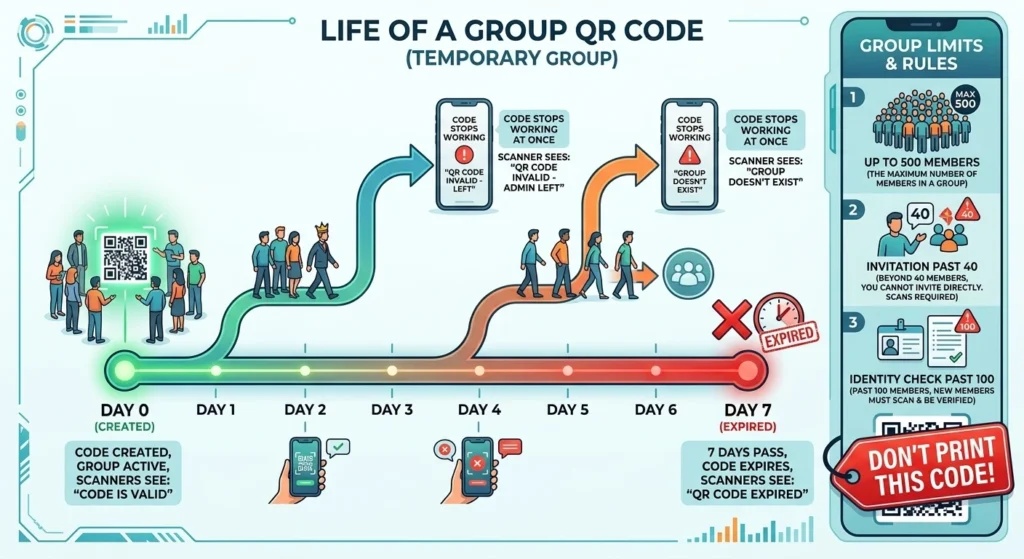
A group QR code in WeChat stays valid for 7 days, says WeChat’s Help Center. The clock starts when you create the code. The expiry date shows below the code. After that date, anyone who scans it sees a notice that the code has expired. Create a new code to invite more people.
The Quiet Mistake That Kills a Group QR Code in WeChat
An organizer in Rotterdam prints 300 posters for a language exchange on Monday. Each poster carries a group code. By the next Monday, every poster is useless.
That is the mistake: printing a code that runs on a 7-day clock. As of October 2026, WeChat’s Help Center adds two more rules. If you share the code and then leave the group, the code stops working. If every member leaves, scanners see a “Group doesn’t exist” notice.
Why group size matters
As of October 2026, the same Help Center says a WeChat group can hold up to 500 members. Past 40 members, WeChat sends an invitation instead of adding people directly. Past 100 members, it asks for identity verification. Big groups add steps for every new person.
How to keep a group open for new people
Use this checklist before you share any group code:
- Ask a member who plans to stay to create the code.
- Write the expiry date next to the code when you share it.
- Test the code on a second phone before you post it.
- Skip print. Put a personal code or an Official Account code on posters, then invite people by hand.
An Official Account is a public page where a business or club posts updates.
How Does a QR Code in WeChat Pay Work?
You stand at a street stall. The seller points at a paper square and names a price. You do not know what happens after you scan.
WeChat Pay is the payment service inside WeChat. Its platform page explains the flow. A merchant makes a collection code. You scan it, confirm the amount and pass the security check.
The scale is huge. CNNIC published its next report in January 2025. It counted more than 1 billion online payment users by December 2024.
Follow these steps at the counter:
- Open Scan in WeChat.
- Scan the seller’s code.
- Type the amount if the code does not set one.
- Enter your payment password.
- Keep the confirmation screen until you leave.
Fixed codes and order codes
A fixed code stays on the counter, and you type the amount yourself. An order code ties to one order, so the amount is already set. WeChat Pay’s platform page says merchants can add order details to make a code for one order.
Think about a noodle seller in Chengdu. She tapes a fixed code beside the till. A cinema app, by contrast, shows an order code at checkout.
Show your own payment code
Some shops scan your code instead. Look for Pay or Money under Services in the Me tab. Menu names shift between app versions, so check the labels on your phone.
Can Foreigners Pay With a QR Code in WeChat in 2026?
For years, many visitors hit a wall at small stalls. Xinhua noted in March 2024 that vendors often prefer mobile payment over cards or cash. A tourist with only a Visa card could feel stuck.
Change began in 2024. In March 2024, Xinhua quoted Zhang Qingsong, a deputy governor of the People’s Bank of China. He said platforms would raise limits for overseas travelers. The single payment limit would rise from $1,000 to $5,000. The yearly limit would rise from $10,000 to $50,000.
Xinhua covered a CNNIC report in August 2024. It counted over five million inbound visitors paying by phone in the first half of 2024. That figure rose 400 percent in one year.
Link a foreign card
Think about a German engineer who lands in Shenzhen with only a Visa card. She links it inside WeChat Pay at her hotel. She brings her passport, because identity checks usually follow. Look for the wallet or bank card option under Services in the Me tab.
Use a home wallet instead
Caixin Global reported in September 2025 that China began piloting a unified cross-border QR system. The pilot started in late July 2025. The system gives overseas wallets one shared gateway into Chinese payment networks. China UnionPay and the Payment and Clearing Association of China built it. Tenpay Global, Tencent’s cross-border payment arm, joined the pilot.
China Daily reported in September 2026 that WeChat Pay now links to nearly 50 overseas wallets. Examples include Hana Pay from South Korea and ZaloPay from Vietnam. Visitors scan a WeChat Pay code with the wallet app they already use at home. Shenzhen, Tencent’s home city, is preparing for more visitors. China hosts APEC in 2026, a forum of Asia-Pacific economies.
Know the limits
Platform limits are not promises. Your card issuer may set lower caps and add foreign fees. Check both before you travel.
How Do You Make a Custom QR Code in WeChat for Business?
A cafe owner in Berlin wants customers to follow her Official Account. The default code looks plain. It also tells her nothing about who scanned it.
Sinorbis, a China marketing firm, wrote in October 2024 that you cannot track standard WeChat QR codes. That gap pushes many businesses to look for a custom QR code in WeChat.
Pick the right code type
WeChat offers several code types. Choose the one that matches your goal:
- Personal code: adds you as a friend.
- Group code: invites people into a chat for 7 days.
- Official Account code: follows a business page.
- Mini Program code: opens a small app inside WeChat. It often looks round.
- Payment code: collects money through WeChat Pay.
Track scans without breaking the code
A standard code carries no scan data. Official Accounts can use special codes that carry a source tag. An agency or developer usually sets these up. Another route is a code that opens a web page first and then WeChat. That adds a step, so test it on iPhone and Android.
Design tips for print
Save the original image from My QR Code. Place it on a white box with a clear border. Do not recolor, stretch or cover its center. Test it on two phones with WeChat’s scanner before you print.
Is It Safe to Scan a QR Code in WeChat?
A QR code hides where it leads. You cannot read the link before you scan. Masahiro Hara, an engineer at Denso Wave, built the square in 1994 to track car parts. A code carries data. It does not prove who printed it.
The trick has grown fast. Microsoft Threat Intelligence published its Q1 2026 email report in April 2026. It counted 7.6 million QR code phishing attacks in January 2026. March 2026 reached 18.7 million. Phishing means a fake message that tricks you into giving up passwords or money. Those numbers track email, not WeChat. The same trick works anywhere a code hides a link, including a QR code in WeChat.
Picture a diner in Shenzhen who sees a payment code on a table. A scammer has stuck a copy of his own code over the shop’s real one. The diner pays a stranger.
Spot the red flags
- A sticker that sits on top of the original code.
- A code that asks for your password or a card code.
- A stranger who sends a “refund” or “prize” code.
- A payment amount you did not agree on.
- A login code you did not start on a computer.
Protect your account
Scan only codes you expect. Read the shop name on the payment screen before you confirm. Start every computer login yourself. If a stranger sends you a code, ask a real friend to confirm it first.
Why Is My QR Code in WeChat Not Working?
Think about a market seller in Milan who recolors his code to match his logo. Customers’ phones read nothing. He reprints from the original image, and it scans again. As of October 2026, WeChat’s Help Center says old group codes show an expired notice.
Quick fix table
| Problem | Likely cause | Quick fix |
|---|---|---|
| “QR Code expired” notice | Group code passed 7 days | Ask a member for a new code |
| Group will not take new people | Size rules past 40 or 100 members | Invite them directly |
| Camera app does nothing | It cannot handle WeChat codes | Scan inside WeChat |
| Screenshot will not scan | Code sits on your own screen | Save it, then use Album |
| Printed code fails | Recolored, stretched or too small | Reprint from the original image |
| Shared code stopped working | You reset your code | Send your new code |
Small checks that save time
Smudges and glare also block scans. Wipe the lens and move out of direct light. Hold the phone still for a few seconds.
Frequently Asked Questions
Can i make my own QR Code for myself?
Yes you can create QR Code with our QR CODE GENERATOR, Fully free, You can create url to qrcode, text to qr code, message qr code, call qr code , wifi password QR code, Email QR Code.
How do I scan a QR code on WeChat?
Open WeChat and tap the plus icon in the top right corner. Choose Scan and point your camera at the code. WeChat reads it and shows the next step, such as adding a contact.
Can I send my WeChat QR code through WhatsApp or email?
Yes. Save the image from the My QR Code screen, then attach it like any photo. The other person must scan it with WeChat, not just view it.
Can I scan a WeChat QR code from a screenshot?
Yes. Save the screenshot, open Scan, tap Album and pick the image. You can also press and hold the image in a chat. Then choose the option that recognizes the code.
Can I use my phone camera to scan a QR code in WeChat?
Sometimes. The camera may read the code but open a generic web page. The scanner inside WeChat gives the safest result.
How long does my personal WeChat QR code last?
WeChat’s help pages list no expiry for personal codes. Some app versions let you reset yours, which makes older copies useless. Test any printed code before you share it widely.
How do I pay with a QR code in WeChat?
Open Scan and scan the shop’s code. Type the amount if the code does not set one. Enter your payment password to confirm, then keep the confirmation screen.
Can tourists use WeChat Pay without a Chinese bank card?
Yes. Visitors can link a foreign Visa or Mastercard after identity checks. Some overseas wallets can also scan WeChat Pay codes. Limits and fees vary, so check before you travel.
Is it safe to scan a QR code in WeChat?
Mostly, if you stay alert. Scan only codes you expect and check the shop name before you pay. Stop at once if a code asks for your password.
How do I log in to WeChat on my computer with a QR code?
Open WeChat on your computer to see a login code. On your phone, tap the plus icon, choose Scan and scan that code. Tap Confirm on your phone to finish.
Do I need a friend to scan a QR code to sign up for WeChat?
Sometimes. WeChat may ask an existing user to scan your code. Verifying with a payment card is the other route.
What is the difference between Weixin and WeChat QR codes?
Weixin serves mainland China, and WeChat serves users elsewhere. Tencent calls them separate but interoperable sister services. Both use QR codes for friends, groups and payments.
What is the difference between Weixin and WeChat QR codes?
Weixin serves mainland China, and WeChat serves users elsewhere. Tencent calls them separate but interoperable sister services. Both use QR codes for friends, groups and payments.
What is the difference between Weixin and WeChat QR codes?
Weixin serves mainland China, and WeChat serves users elsewhere. Tencent calls them separate but interoperable sister services. Both use QR codes for friends, groups and payments.
Your Next Scan Should Take Five Seconds
The square looks simple, but it carries your friends, your groups and your money. Three ideas matter most. First, scan inside WeChat, and use Album when the code sits on your own screen. Second, group codes last 7 days, so never print one. Third, check any payment code before you confirm, because a code hides where it leads.
Those habits turn a QR code in WeChat into a safe shortcut in October 2026. A code is only a door, and you choose whether to walk through.
For the full history of the square itself, read the Wikipedia entry on QR codes.