

Build your code
01 / INPUTQR Code Generator
Instant • Professional • Privacy First
Vinlyeepro.com/freeQRcodegenerator
How to create a free QR Code in 3 simple steps
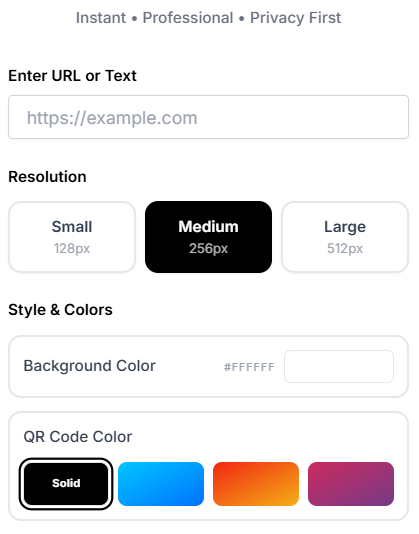
When I first started using digital design tools, I quickly realized that simplicity is the ultimate feature. You shouldn’t need a tutorial to use a basic utility. Here is how you can use this freeqrcodegenerator to go from a standard URL to a beautiful, scannable graphic in just a few seconds.
Updates as You Type
Watch the code generate live while you enter your link or text, so you know exactly what you’re about to download before you commit to printing it anywhere.
Not Just for Links
Plain text and contact card details work too — it’s not limited to web URLs.
Sized to Actually Scan
A QR code that looks fine on-screen can fail to scan once it’s shrunk onto a flyer or business card. This is generated at a resolution built to hold up in print.
Points Straight to Your Content
The code is generated in your browser and links directly to what you typed — it isn’t routed through a third-party redirect first.
Unlimited, No Watermark
Generate as many as you need for menus, cards, or signage — no cap, nothing added to the image.
Free QR Code Generator
If you have ever spent time building a marketing campaign, designing a wedding invitation, or setting up a restaurant menu, you know how frustrating it is to find a tool that promises to be free, only to hit you with a paywall right before you download your file. I have been exactly where you are. In my experience, hunting down a genuinely free tool online can feel like searching for a needle in a haystack.
That is exactly why this free qr code generator was built. I wanted to help provide a solution that is straightforward, stunning, and completely transparent. Whether you are a small business owner, a student, or just someone looking to share a link quickly, this web-based tool does exactly what you need it to do, without any of the usual industry gimmicks.
I’m new to QR Codes. What should I know?
If you have never generated one before, you might be wondering what the hype is all about. “QR” stands for Quick Response. Think of a QR code as a visual barcode that smart devices can read instantly using their built-in cameras. Instead of forcing your customers or friends to manually type out a long, complicated web address, they simply point their phone at the code, and a clickable link pops up on their screen.
In my experience, QR codes are the ultimate bridge between the physical and digital worlds. I remember setting up a booth at a local networking event a few years ago. I spent hours talking to people, but I ran out of business cards halfway through the day. I quickly generated a QR code linking to my LinkedIn profile, saved it as my phone’s lock screen, and simply had people scan my phone. It worked perfectly and arguably left a better impression than a paper card!
You can use them on real estate signs, product packaging, wedding RSVPs, or even on a piece of paper taped to your fridge to let guests easily join your home Wi-Fi network. The technology has evolved incredibly since its invention in 1994. If you want to dive deeper into the fascinating mechanics behind how these pixelated squares store data, you can read more about the history and technical specifications of QR codes on Wikipedia.
Frequently Asked Questions
Is this freeqrcodegenerator really 100% free?
Yes. I know it sounds too good to be true because so many other tools claim to be free but lock your downloads behind a trial. This tool has no premium tiers, no subscriptions, and requires zero payment.
Do the QR codes generated here expire?
No, they will never expire. Because this tool generates “static” QR codes, the URL you enter is permanently embedded into the pattern of the image itself. As long as the website URL you linked to remains active on the internet, your QR code will continue to work flawlessly forever.
Is my data private and secure?
Absolutely. One of the biggest advantages of this tool is that it is a fully client-side web application. This means there is no central server receiving, logging, or storing the URLs you enter. The processing happens locally within your web browser, making it completely private.
Which size should I choose?
It depends on where you plan to place the image. I recommend the Small (128px) size for tight spaces like business cards or the corners of physical documents. The Medium (256px) size is the sweet spot for standard printed materials like brochures, table tents, and flyers. If you are printing a large poster, a storefront window decal, or a banner, you will definitely want to select the Large (512px) option to ensure it remains sharp and easily scannable from a distance.
Can I use these QR codes for commercial purposes?
Yes! Because there are no limits and no licensing restrictions attached to our freeqrcodegenerator, you are completely free to use the generated images for both personal projects and professional, commercial marketing campaigns.