
Word finishes loading, the CV is done, and there’s one small decision between you and hitting send: save it as a PDF, or leave it as a Word (.docx) file? It looks like a five-second choice. It usually isn’t — not once the application runs through an Applicant Tracking System, which across Europe now means most mid-size and large employers, not just the multinationals.
Whether a CV should be PDF or Word for ATS is a question I get asked constantly through the ATS Resume Checker on this site. Someone uploads their file, the score comes back lower than expected, and the first thing they assume is that they picked the wrong format. Usually, they didn’t. Usually, the format was never really the problem.
Quick answer: a clean, text-based, single-column PDF is the safer default for most European applications in 2026. Word wins only in specific situations — a job post that asks for it directly, an older or stricter ATS, or a CV complicated enough that you’d want a recruiter to be able to open and adjust it themselves. The deeper answer, and the one that actually changes outcomes, is about what’s built into the file, not what it’s called.
Why “Just Use Word” Advice Refuses to Die
This advice comes from somewhere real. Six or seven years ago, plenty of Applicant Tracking Systems genuinely mangled PDFs — text landed in the wrong order, whole sections disappeared, and Word was the safer bet by a wide margin. That advice spread through forums and CV-writing guides and stuck around long after the systems it warned about had moved on.
The scale involved is worth taking seriously either way. Jobscan’s most recent usage report found a detectable ATS behind 97.8% of Fortune 500 career pages in 2025, and broader research consistently puts overall adoption above three-quarters of companies once mid-size employers are included. Workday, Greenhouse, Oracle Taleo and SAP SuccessFactors run a large share of that between them — and all four show up constantly on the career pages of companies hiring across the EU and UK, not only in the US.
What the ATS Is Actually Doing With Your File
An ATS doesn’t “read” a CV the way a person does. It opens the file, pulls out the raw text, and tries to sort that text into fields — name, dates, job titles, skills. Whatever survives that extraction step is what a recruiter eventually searches and filters against. Whatever doesn’t survive it might as well not be on the page at all.
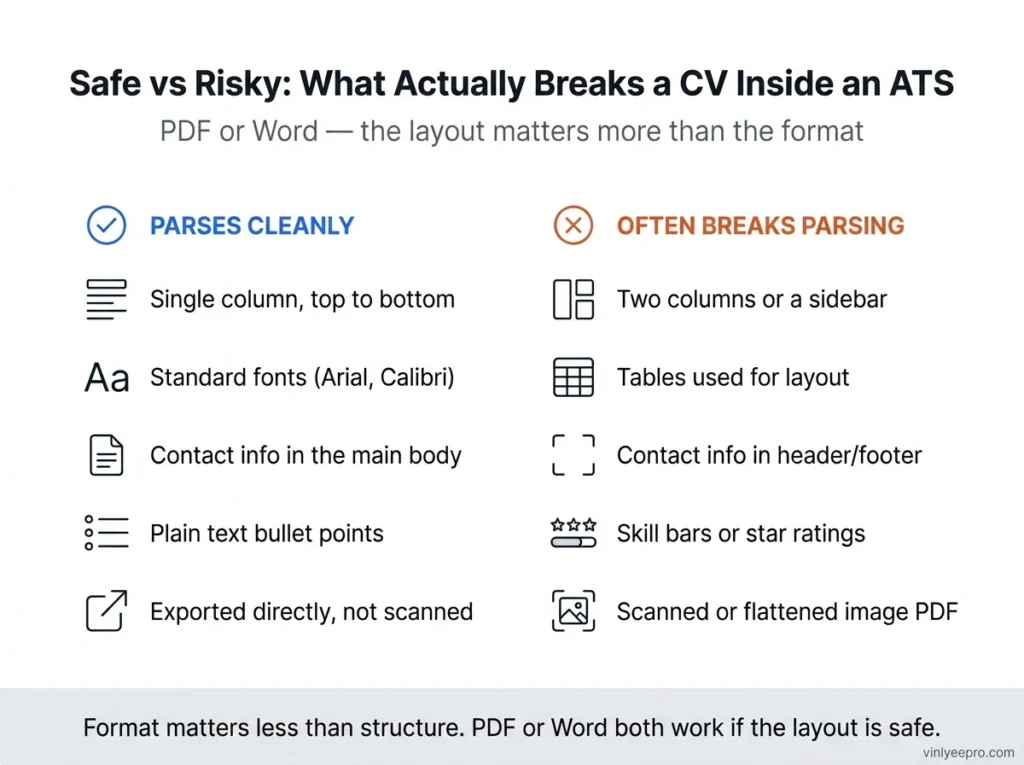
A handful of structural choices cause almost every parsing failure I’ve come across, in PDFs and Word files equally:
- Multi-column layouts and sidebars. A parser reading left-to-right will often read straight across a two-column CV, stitching your skills sidebar into the middle of a job description.
- Tables used for layout. Great for a language-proficiency grid, terrible for parsing — cells frequently get merged or reordered.
- Text in headers or footers. Many parsers skip that region entirely. Name and phone number living there can mean an applicant with no name attached.
- Non-standard fonts. Without your exact font installed, the parser substitutes something else — and that can drop or garble characters, not just change the typeface.
- Image-based files. A CV flattened out of a design tool, or a scan saved as a PDF, has no real text layer underneath. It looks perfect on screen and reads as nothing.
None of that is specific to PDF or Word. Both formats can carry every one of those problems, and both can avoid them. File type is a smaller decision than the structure inside it — the part most “PDF vs Word” advice skips entirely.
Workday, Greenhouse, Taleo, SuccessFactors: What Actually Changes
| System | Pattern worth planning around |
|---|---|
| Workday | Runs a large share of big EU and UK employers. Strict about single-column layouts, strips headers/footers, and does best with a plain PDF or Word file over anything template-heavy. |
| Greenhouse | Generally solid with clean, text-based PDFs. Total file size matters more here than the format itself. |
| Oracle Taleo | Still widely used across European public-sector and enterprise postings. Historically the least forgiving of the four with complex PDFs. |
| SAP SuccessFactors | Common across German and wider EU corporate hiring — handles both formats fine as long as the layout stays simple. |
If a job posting tells you which format to upload, that instruction beats any general rule on this page, including this one. Configurations vary even within the same platform from one employer to the next.
What Almost Every US-Focused Guide Leaves Out
Most CV advice is written for English names with no accents, and it shows. A large share of European CVs don’t have that luxury — Müller, François, Björn, Zoë, Kraków. Diacritics can get mangled during text extraction, especially in files from older software or fonts that don’t map every accented character correctly. In the worst case, a candidate’s own name comes out the other side missing a letter. A smaller, stranger version of the same bug hides in ordinary words too: some PDF exports store letter pairs like “fi” or “fl” as one joined character for nicer-looking type, and if that doesn’t map cleanly back to two letters, a word like “office” can silently lose a letter in the parsed text — invisible on screen, very visible to a keyword search.
Europass makes this worse by design. The official EU template leans on table layouts for things like the language self-assessment grid, and I’ve written before about why that choice makes Europass CVs a recurring headache for ATS parsing, regardless of which format you save it in.
One more habit worth dropping: showing skill levels as progress bars or filled dots (“Python ●●●●○”). It looks clean, and an ATS extracts none of it — parsers read text, not shading. Write “Python (Advanced)” instead and the information survives.
The fix for accents costs nothing: after exporting, copy all the text out of your CV and paste it into a plain text file. If your name, dates and bullets come out intact and in order, an ATS will likely see the same. If they come out scrambled, so will the system on the other end.
So Which One Should You Actually Send?
After going through a lot of uploaded CVs while building the checker on this site, this is the order I’d work through:
- Does the posting specify a format? Follow it, every time, no exceptions.
- No instructions, plain single-column layout, standard font, no photo table? Export a text-based PDF — it locks your formatting exactly as designed, and every ATS built or updated in recent years handles it fine.
- Sidebar, table-based layout, or built in a design tool? Word is the safer bet short-term, but simplify the layout itself too, since neither format rescues a structure that was never going to parse well.
- Applying somewhere with an older or stricter internal system, or a recruiter has explicitly asked for Word? Send Word.
Keep one clean version of each ready to go — it costs nothing and saves you rebuilding a document at 11pm before a deadline.
Mistakes I See Come Through Constantly
- “Print to PDF” instead of “Export as PDF.” Printing drags in more clutter than a direct export from Word, which is often why a one-page CV balloons to several megabytes.
- Skill bars and star ratings in place of plain text — invisible to a parser, however good they look to you.
- A profile photo at full camera resolution, inside a table, inside a Europass-style template — three parsing risks stacked into one file.
- Contact details sitting in the header because it looked tidy, then vanishing once the system strips that region out.
- A CV built entirely in Canva and exported as what’s technically a PDF but is really a flattened image with almost no real text underneath it.
Quick Checklist Before You Submit
Job post doesn’t specify a format (if it does, that instruction wins)
Single-column layout, no sidebar
Contact details in the body, not the header or footer
A standard font — Calibri, Arial, Garamond, or Times New Roman
Exported directly from Word or Google Docs, not printed or scanned
Accented characters checked after export (the copy-paste test above)
File size reasonable — here’s the full fix if it isn’t
Run the final file through the ATS Resume Checker before it goes anywhere
Frequently Asked Questions
Can an ATS read a PDF CV?
Yes, in effectively every system built or updated in recent years — provided it’s a genuine text-based PDF, not a scanned image or a flattened export from a design tool.
Is Word always safer than PDF for ATS?
Not anymore. That was more consistently true years ago; today the layout inside the file matters more than the format you pick.
Does a photo on a CV break ATS parsing?
Not directly — but how it’s usually added, inside a table, in a Europass-style layout, often does. Here’s the full breakdown.
None of this is complicated once you know what to check. It’s just not the kind of thing you find out until an application quietly disappears with no explanation. Run your CV through the ATS Resume Checker before your next application — it’s free, nothing gets uploaded to a server, and it takes about a minute to tell you whether the file you’re about to send actually holds together the way it looks like it does on your screen.