
Your photo looks clear, but the upload form still rejects it. In October 2026, conflicting size advice can make that problem harder. UTI photo resize online means adjusting your photograph’s dimensions, format, and file size for your specific PAN application.
Start with the requirements beside your actual upload field. Then crop your image, enter the requested dimensions, export it, and check the saved file. A preset helps only when its settings match those requirements.
This guide explains that process using VinlyeePro’s photo resizer, including settings I checked with a nonpersonal test image. You will learn how pixels differ from print measurements and how compression affects clarity. You will also learn why signatures need separate settings. Applicants in the United States, United Kingdom, and Canada can follow the same checks.
UTI photo resize online: what settings should I use?
The first problem is conflicting advice. One page recommends a square photograph, while another lists a taller frame. Neither recommendation proves what your application currently accepts.
Read the current application before choosing a preset
UTI Infrastructure Technology and Services Limited, or UTIITSL, provides PAN application services. Its official notice introduced new PAN forms from April 1, 2026.
That update concerns application forms. It does not establish a universal digital photo size. Check the instructions within your current application before copying settings from an older tutorial. Source: UTIITSL’s April 2026 application notice.
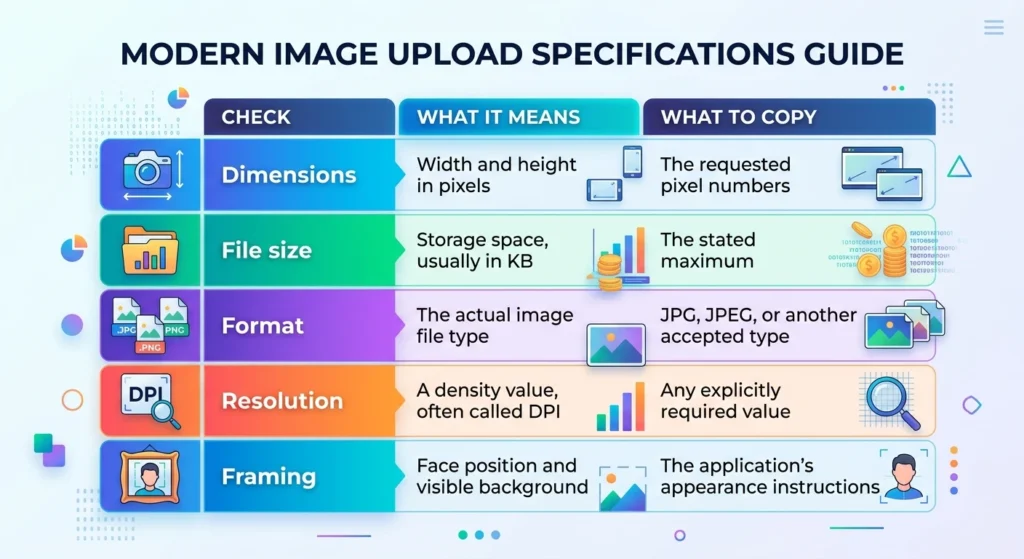
DPI means dots per inch. Photo tools often use that label for the image’s print density.
For a UTI photo resize online task, treat these requirements as a set. Meeting one does not guarantee that you meet the others.
Keep individual applications in focus
The Income Tax Department reported 855,946,611 PAN allotments through March 2026. Individuals represented 97.95% of that total. This guide focuses on preparing an individual applicant’s photograph. Source: Income Tax Department, PAN Allotment Statistics through March 31, 2026.
Suppose an applicant in Manchester follows a saved tutorial from 2023. The tutorial might explain cropping correctly while showing an outdated application form.
The practical fix is simple: open the current form first. Write down its upload requirements before editing anything.
How do I resize a UTI photo to 213 × 213 pixels?
A 213 × 213 image has equal width and height. However, you should use those dimensions only when your application requests them.
For this UTI photo resize online example, imagine your upload field explicitly asks for that square size.
Start with a clear original
A tall portrait will not fit a square frame without a decision. You must crop it, add surrounding space, or distort it.
Distortion changes the face’s proportions. Crop carefully instead, while preserving the framing your application requires.
Adobe’s September 2026 guidance explains how resizing and resampling affect image dimensions. Resampling means adding or removing pixels. It cannot reliably restore detail that the original image never captured. Source: Adobe’s image size and resolution guidance, updated September 28, 2026.
Suppose your source is a clear 1200 × 1600 portrait. You have room to crop before reducing its dimensions.
A tiny screenshot gives you less useful detail. Return to the original camera file whenever possible.
Enter the requested settings in VinlyeePro
Open the VinlyeePro photo resizer and follow this sequence:
Upload the original photograph.
Choose Pixels as the measurement unit.
Enter 213 for width and 213 for height.
Set the requested DPI value, if the form specifies one.
Expand Image Control and inspect the framing.
Use the crop and positioning controls as needed.
Select JPEG if the application requests JPG or JPEG.
Download the result and inspect its file details.
The interface includes Enter Crop Mode, Fit Frame, and Center Image controls. Use the preview to check their effect before saving.
Check the face after changing the frame
Watch the head, chin, shoulders, and surrounding space. Do not assume that a centered canvas automatically creates suitable identification framing.
If the source needs rotation first, use the basic image editor. Save the corrected source before creating the final application copy.
Why does a UTI preset show 295 pixels instead of 213?
A preset name can sound correct while producing different dimensions from your upload field. This is the most useful detail I found during the interface check.
What I observed in the tool
In October 2026, I checked the UTI photo resize online settings with a nonpersonal test image.
The source measured 1200 × 1600 pixels. VinlyeePro’s UTI PAN Card (25×25mm) preset selected millimeters, a square 25 mm frame, and 300 DPI.
The live frame displayed 295 × 295 pixels.
I then selected pixels and entered 213 for both dimensions. The interface changed to Custom Size and displayed 213 × 213 pixels.
My test session did not return a downloaded file for inspection. These observations cover the displayed settings, not exported metadata or successful PAN acceptance.
Why both numbers can be mathematically correct
Millimeters describe a physical measurement. Pixels describe the image grid.
At 300 pixels per inch, a 25 mm side needs approximately 295 pixels. A 213-pixel side at that density measures approximately 18 mm.
Adobe’s September 2026 guidance explains this relationship between pixel dimensions, physical size, and resolution. The label alone cannot make those measurements interchangeable. Source: Adobe’s image size and resolution guidance.
Use this unit check before exporting
The calculation is:
Millimeters ÷ 25.4 × pixels per inch = pixels
For this example:
25 ÷ 25.4 × 300 ≈ 295 pixels
Suppose a Toronto applicant needs 213 × 213 pixels but chooses the 25 mm preset. The preview can look perfectly square while exceeding the requested dimensions.
Choose the unit that matches the application’s wording. Enter its numbers directly, then inspect the displayed frame.
This small check prevents a common UTI photo resize online mistake: treating a familiar preset name as proof.
How do I reduce a UTI photo below 30 KB?
A correctly sized photograph can still exceed a file limit. Dimensions and file size measure different things.
Use 30 KB as your target only when your upload field specifies that limit.
How can I make a UTI photo smaller than 30 KB?
First, set the required pixel dimensions and choose JPEG when the application accepts it. Then lower JPEG quality gradually until the file falls below 30 KB. Inspect the saved image after each change. Keep the face clear, and follow your application’s actual limit if it differs.
Compress after you finish cropping
The order matters because later edits can change the file size again.
Complete the crop, dimensions, and format first. Then open the VinlyeePro image compressor if the saved image still exceeds your limit.
Its interface showed a default quality setting of 80 during my October 2026 review. That starting value does not promise a particular file size.
Different photographs contain different amounts of detail. A plain background and a textured wall can produce different results at identical settings.
For a UTI photo resize online workflow, make small changes and check each result:
Keep the requested dimensions unchanged.
Reduce quality slightly from the starting setting.
Save a separate copy.
Check its size in file properties.
Inspect the eyes, hairline, and face edges.
Suppose your first export measures 42 KB. Your next attempt might reach 34 KB, while a further adjustment reaches 27 KB.
Those figures illustrate a process, not a measured result or guaranteed compression rate.
Leave room below the ceiling
A displayed size can involve rounding. Aim comfortably below the stated maximum without making the face unclear.
If a 29 KB copy looks sharp, there is little reason to chase 12 KB. Excessive compression can create blocks, smears, and rough edges.
Also check any maximum-width setting inside the compressor. A smaller file should still retain the dimensions your application requires.
How do I resize a UTI photo and signature on my phone?
Phone photos create two separate problems: unfamiliar file formats and confusion between photographs and signatures.
Treat each file as its own upload. A square photo preset should not decide the shape of your signature.
Convert an iPhone photo when necessary
Some iPhones save photographs in HEIF, a space-saving image format that commonly uses the .heic extension.
Apple’s December 2025 guidance explains how to export these images into more widely compatible formats. Its Most Compatible camera setting affects new photographs, not existing files. Source: Apple’s HEIF and HEVC guidance, published December 5, 2025.
Suppose an applicant in Birmingham selects a recent iPhone photograph. The file picker shows an HEIC file, but the application requests JPEG.
Convert the existing photograph rather than merely changing its filename. Renaming “portrait.heic” to “portrait.jpg” does not change the image’s actual format.
The VinlyeePro image converter lists HEIC among its supported formats. Check whether it opens your particular file, then select the required output format.
For a UTI photo resize online task, conversion should happen before your final size check. Conversion can change the file’s storage size.
Prepare the signature separately
A signature often needs a wider frame than a portrait. Read the signature field’s requirements independently.
If that field specifies 400 × 200 pixels, use those values for that file. Do not assume every UTI application uses that example.
Start with a sharp image of the signature. Remove unnecessary surroundings without cutting the first or last stroke.
Keep the signature’s natural proportions. Stretching the writing to fill every edge can change its appearance.
Find the saved file before opening the application
On your phone, confirm the filename and save location. Open the downloaded copy through your file manager.
Suppose your photo and signature both receive the name “download.jpg.” Rename them clearly before uploading, while preserving the actual file extension.
A clear filename helps prevent choosing the wrong attachment. It does not replace checking the preview beside each application field.
Why does my UTI photo fail after downloading?
The preview can show the correct dimensions while the saved file contains different information. Another editing app can also change the file after you download it.
Does 300 DPI mean the photo has the correct dimensions?
No. DPI describes print density, while pixel dimensions describe the image’s width and height. A 213 × 213 image and a 295 × 295 image can both carry 300 DPI. Check pixels, file size, format, and any required density separately before uploading your final saved copy.
Inspect the file, not just the tool’s label
Mozilla’s February 2026 documentation describes a relevant browser export behavior. Standard canvas exports use 96 DPI metadata for supported formats.
Metadata means information stored alongside the image, such as its resolution. A tool can add further processing to write a different value.
That means a 300 DPI control does not, by itself, verify the exported file’s metadata. Source: Mozilla’s canvas export documentation, updated February 12, 2026.
This does not prove that VinlyeePro exports the wrong density. If your application requires a density value, check it in software that reads image resolution. A basic phone preview may show only dimensions and file size.
Follow the file through its final step
Suppose a student in Leeds exports a suitable JPEG, then edits it inside another app. The second app may create a new file with different dimensions, size, or metadata.
Check the copy you actually select for upload.
Use the portal’s error message to decide your next action:
| Error | Check first | Next step |
|---|---|---|
| File too large | Saved file size | Compress the final copy |
| Wrong dimensions | Width and height | Enter the requested pixels |
| Unsupported format | Actual image format | Export into an accepted format |
| Image unclear | Original and saved preview | Start from a sharper source |
| Upload fails without detail | File selection and connection | Reopen the file and retry carefully |
A UTI photo resize online tool prepares an image. The application’s checks still determine whether it accepts that image.
Avoid repeatedly changing every setting after one error. Fix the stated problem, save a fresh copy, and test that copy.
Can I use UTI photo resize online from the US, UK, or Canada?
Living abroad does not change the difference between pixels, file size, and print measurements. However, it makes choosing the correct application especially important.
Choose the application route before editing
The Income Tax Department’s PAN page, updated April 17, 2026, lists the current form categories.
Form 93 covers Indian individuals, including nonresident Indians. Form 95 covers individuals who are not Indian citizens. CR-01 covers corrections for individuals. Source: Income Tax Department’s PAN guidance, updated April 2026.
Your country of residence alone does not determine your citizenship category. Read the current instructions for your circumstances before preparing attachments.
Suppose an Indian citizen in New York needs a new PAN. A friend in Canada needs to correct an existing record.
They should not assume the same application path or attachment instructions. Each person should check the relevant current form.
Do not substitute local passport dimensions
A photograph suitable for another document may need different framing or dimensions. The name “passport photo” does not define one universal digital file.
Likewise, printed photo instructions do not automatically define a digital upload.
UTIITSL’s physical application guidance specifies two identical photographs measuring 4.5 × 3.5 cm. That is a physical submission requirement, not proof of a 213-pixel digital specification. Source: UTIITSL’s physical application guidance, checked October 2026.
For UTI photo resize online preparation abroad, keep the application instructions beside the editing tool.
A local photo shop can supply a useful original image. Ask for the digital original when available, then prepare the copy your application actually requests.
You do not need different cropping mathematics because you live in Vancouver, London, or Chicago. You need the correct requirements for the document and application route.
Is UTI photo resize online safe for personal photographs?
An identification photograph deserves more care than a casual social image. The useful question is how the service handles your file.
Read the file policy and the cookie policy
VinlyeePro’s privacy policy, updated January 26, 2026, describes processing files within the browser. It also describes advertising cookies separately. Source: VinlyeePro’s privacy policy.
Local processing means the site says your device handles the file work. It does not mean the page makes no network connections or uses no cookies.
Those are separate privacy questions.
I have not independently audited the site’s data handling. My interface test used a nonpersonal image rather than someone’s identification photograph.
Reduce unnecessary exposure during preparation
Suppose you are helping a relative from a shared laptop in Toronto. Several downloaded versions may remain after the application ends.
Keep the original somewhere the owner controls. Once they confirm the submission and retain needed copies, remove unnecessary duplicates from the shared device.
Use a UTI photo resize online service for the photograph itself. Avoid adding an Aadhaar scan or another full identity document when the task only needs a portrait.
Before working with someone else’s photo, agree where you will save the result. Confirm which copy they want you to keep.
A practical preparation check includes four points:
Read the service’s current file-handling statement.
Use only the image needed for the task.
Keep track of downloaded copies.
Close the session on a shared device.
A privacy statement helps you understand the service’s claims. Treat it as information to assess, rather than a guarantee about every browser, extension, or device.
Frequently Asked Questions
How do I resize my photo and signature for a UTI PAN card?
Read each upload field’s requirements separately. Crop the photograph and signature into their required shapes, then set their dimensions. Export each into an accepted format and check the saved files before uploading.
What is the photo size for a UTI PAN card?
Use the measurements in your current application. Third-party tools offer different presets, including square frames. Printed photograph measurements and digital pixel dimensions describe different requirements, so do not substitute one for the other.
How can I resize a photo online?
Upload the original into an image resizer, choose the correct unit, and enter the required dimensions. Adjust the crop without stretching the face. Download the result and verify its format, dimensions, and file size.
How do I resize a photo to 213 × 213 pixels?
Choose pixels as the unit, then enter 213 for width and height. Crop the source into a suitable square first. Use these numbers only when your application specifically requests them.
How do I resize a photo for an online form?
Copy the form’s dimensions, format, and maximum file size before editing. Apply those settings to a clear original. Inspect the final saved copy, because a tool’s preview does not verify every export detail.
How can I convert a photo to 2 × 2 inches online?
Choose inches and set both sides to two, then enter the required print density. At 300 pixels per inch, that means 600 × 600 pixels. Use this size only when your document requires it.
Can I use UTI photo resize online on an iPhone?
You can try the browser tool on your iPhone with a supported image. Convert HEIC if your application requires JPEG. Check the saved file in your file manager before selecting it for upload.
How do I reduce a UTI photo below 30 KB?
First finish the crop and required pixel dimensions. Then reduce JPEG quality gradually, checking clarity and file size after each export. Follow a different limit when your application specifies one.
Are JPG and JPEG different formats?
JPG and JPEG are common filename extensions for the same image format. Follow any filename rules the application gives. Changing a PNG or HEIC extension to JPG does not convert the underlying image.
Why does my resized photo look stretched?
The width and height may have changed independently from the original proportions. Start again from the original and crop to the required shape. Avoid forcing a tall portrait directly into a square.
Does choosing 300 DPI make my photo sharper?
Changing density metadata alone does not add facial detail. Start with a sharp original and preserve its clarity during resizing. Check any separate DPI requirement without treating it as a sharpness control.
Does a UTI photo resizer guarantee approval?
No image editor can confirm the application’s final decision. A suitable file must meet the relevant technical and appearance requirements. Preview the uploaded photograph and signature before you finish submitting the form.
Get the saved file right before you submit
A reliable UTI photo resize online workflow starts with the current application’s instructions. Keep dimensions, file size, format, and any density requirement separate.
Choose a clear original, crop carefully, and compress only after the main edits. Treat preset names as starting points, especially when millimeters and pixels produce different frame sizes.
Before submitting, open the exact file you plan to upload. Confirm that the photograph remains clear and that the signature belongs in its own field. The final saved copy deserves the same attention as the editing screen.
Trust the checked file, not the preset label.