
I’ve generated more QR codes than I can count while building the free tool on this site, and lately the question landing in my inbox isn’t “how do I make one” — it’s some version of “is a QR code generator actually safe to use?” That’s a fair thing to ask in 2026. QR codes are more woven into daily life across Europe than at any point since the pandemic, and “quishing” — QR code phishing — has gone from a niche security term to something UK councils are now putting on official warning notices.
So let’s actually answer it properly: what makes a QR code safe or not, what the 2026 fraud numbers really show, and — because I’ve had to make this exact decision while building VinlyeePro’s own QR Code Generator — what GDPR actually requires from the tool you use to create one. Almost nothing I found while researching this covers that last part clearly, so that’s where I want to spend the most time.
What Actually Makes a QR Code “Unsafe”
Here’s the short version, because it gets muddled a lot: the black-and-white pattern itself can’t be hacked, infected, or weaponised. It’s just a grid encoding a short piece of data — almost always a URL — the same way a barcode encodes a product number. Your phone’s camera reads that data and shows you a link, exactly like tapping a link in a text message.
So “is scanning dangerous” really splits into two separate questions. First: can you trust where the code leads? Second: can you trust whoever made the code, and the tool they used to make it? Most articles on this topic only cover the first question. The second one is where things get genuinely interesting, and it’s the part that matters most if you’re the one creating codes for a menu, a poster, or a business card.
The 2026 Quishing Numbers — Why Everyone’s Suddenly Asking This
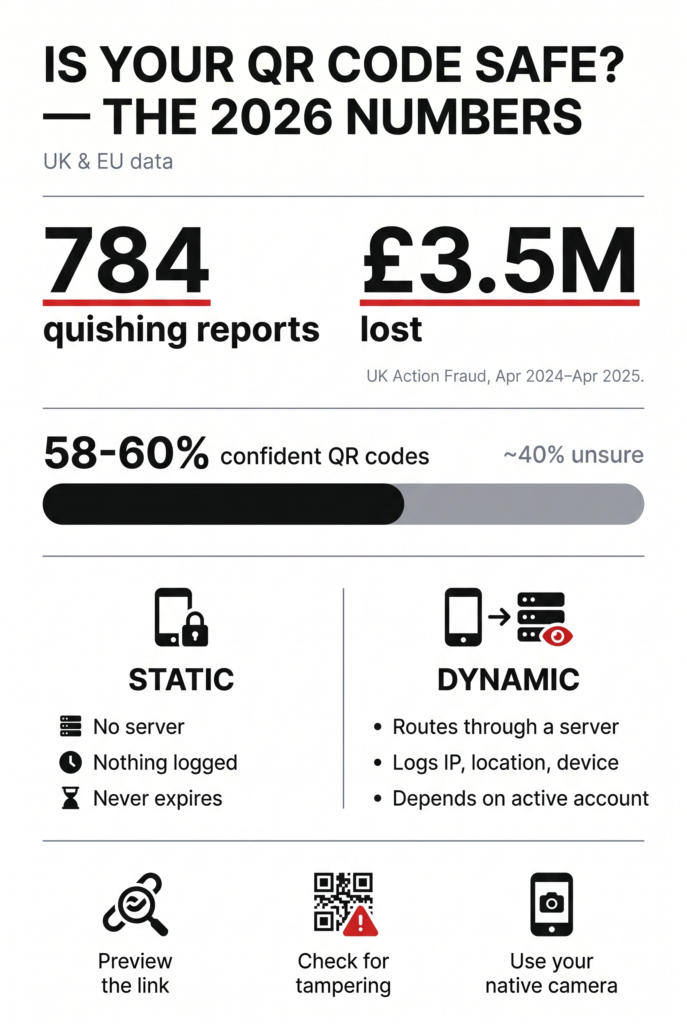
Action Fraud, the UK’s national fraud reporting centre, logged 784 reports of quishing between April 2024 and April 2025, with victims losing close to £3.5 million — more than £10,000 a day. It’s gotten bad enough that National Car Parks (NCP) has reportedly been reviewing whether to pull QR codes from signage entirely across its roughly 800 UK sites, pointing customers back to its website instead.
Europol’s 2026 Internet Organised Crime Threat Assessment flags QR-enabled fraud as one of the patterns growing fastest across the EU, and it isn’t only a consumer problem. Europol has previously documented cases where fraudsters slipped QR codes into fake supplier invoices to quietly redirect business payments to accounts they controlled — a reminder that this hits small businesses too, not just shoppers.
The pattern behind most consumer cases is almost always the same: a fake sticker placed directly over a real QR code in an unattended public spot — a parking meter, a station wall, a “council notice” pushed through a letterbox. Because a QR code doesn’t display its destination in plain text the way a normal link does, tampering is genuinely hard to catch at a glance.
None of this means QR codes are secretly dangerous. A 2026 industry survey found that roughly 58–60% of consumers already feel confident QR codes are safe to scan — but that also means something like four in ten people aren’t sure, and that trust gap is exactly why this question keeps showing up in Google.
Scanning Safely: A Quick Checklist
- Preview the link before you tap it. Most phone cameras show the destination URL before opening it — read it.
- Be extra cautious in open, unattended places — car parks, station walls, community noticeboards — where sticker-over-sticker tampering happens most.
- Treat a QR code that arrives by unexpected email, text, or letter exactly like you’d treat a suspicious link, because that’s what it is.
- Use your phone’s built-in camera to scan, not a random third-party scanner app with its own permissions and its own agenda.
- Don’t hand over payment or personal details immediately after a scan. Check the domain first.
Is Your QR Code Generator Safe? (The Question Behind the Question)
Here’s what I think is actually going on with most people searching this: they’re not worried about scanning someone else’s code. They’re about to make one — for a restaurant menu, a wedding invite, an event poster — and they want to know if the tool they’re about to trust is trustworthy. Fair question, and one I had to answer honestly while building this site’s own generator.
Most free QR tools create what’s called a dynamic code by default, often without saying so plainly. A dynamic code doesn’t point straight at your content — it points at the generator’s own short-link server, which then forwards the visitor on to your real destination. That’s how those tools let you edit the destination later and show you scan counts. Useful features, but they come with a quiet trade-off.
That server sits in the middle of every single scan, and it typically logs the visitor’s IP address, an approximate location, device type, and the exact timestamp. Under Article 4 of GDPR, that combination is usually enough to identify a specific person, which makes it personal data. That, in turn, makes the QR platform a data processor and your business the data controller, with real obligations attached: a lawful basis for collecting it under Article 6, and in most cases a signed processing agreement under Article 28. Almost nobody printing QR codes for a café menu realises they’ve technically taken on any of that.
There’s a second, quieter risk. Because a dynamic code’s destination lives on someone else’s server tied to an account, that account becomes a single point of failure. A subscription lapses, an account gets suspended, or the wrong person gets access, and every code you’ve already printed and handed out can stop working — or, worse, get quietly repointed somewhere else, since editability after printing is the entire feature.
None of this is theoretical to European regulators. In 2023, France’s CNIL fined ad-tech company Criteo €40 million — a decision upheld on appeal in 2026 — specifically over how it handled consent for the same category of data QR scan-tracking generates: IP addresses and device-level identifiers used to build a behavioural profile. That case had nothing to do with QR codes, but it’s a real, concrete example of how seriously EU regulators now treat exactly this kind of tracking data.
A static, fully client-side generator sidesteps the whole problem, because there’s no server in the middle at all. The QR Code Generator built into VinlyeePro works this way, in line with our privacy policy: your link is encoded directly into the pattern inside your own browser, nothing is transmitted anywhere to be logged, and the code has no account it depends on to keep working. That’s not a marketing line, it’s just what “no server involved” actually means. To be fair, going static doesn’t automatically make an entire campaign GDPR-safe on its own — whatever page you’re linking to can still collect its own data independently. But it does remove the QR generator itself as a hidden third party in the equation, which is the part almost nobody thinks to check.
When Dynamic Actually Makes Sense
Static isn’t the right answer for every situation, and it’s worth being honest about that. Dynamic codes earn their keep when you genuinely need to change the destination after thousands of copies are already printed, or when you’re running a large multi-location campaign and actually need scan analytics to make decisions. Those are real use cases.
But for a huge share of everyday QR codes — a menu that doesn’t change every week, a Wi-Fi password taped to a fridge, a vCard on the back of a business card, a direct link to your Google review page, a single event poster — you’re not editing the destination or reading analytics later anyway. In that case, static isn’t the compromise option. It’s simply the simpler, more private choice that does exactly what you need and nothing you don’t.
A Pre-Print Checklist, If You’re the One Creating the Code
- Scan-test on at least two phones (iPhone and Android) before you print anything at scale.
- Add one short, visible line of text near the code — “Scan for the menu — yourdomain.com” — so people can sanity-check the destination at a glance and notice quickly if it’s ever been swapped.
- Protect the physical placement. A laminated code, or one mounted under a fixed cover, is much harder to stick a fake sticker over than a loose sheet of paper.
- Spot-check codes in public or unattended locations every so often, especially anything near a payment point.
- If you don’t specifically need editing-after-print or analytics, use a free static QR code generator so there’s no third-party server logging your customers’ data in the first place — one less thing to secure, disclose, or worry about.
Frequently Asked Questions
Is scanning a QR code itself dangerous?
No — the code is just encoded data, the same as a printed link. The risk sits entirely in the destination it points to, and, for a dynamic code, in whoever controls the server managing that destination.
What is quishing?
Quishing is phishing carried out through a QR code instead of a text link — usually a fake code stuck over a real one, or one sent by email or letter, that leads to a fraudulent site designed to steal payment or personal details.
Are QR codes GDPR compliant?
QR codes themselves don’t collect any data. Whether a specific use is GDPR compliant depends on what happens after the scan: mainly, whether a dynamic-code platform logs data like IP address and location, and whether your business has a lawful basis and, where required, a processing agreement covering that.
Static or dynamic — which is more private?
Static, by design. There’s no third-party server involved after the code is generated, so there’s no scan data for anyone to log, store, or lose in a breach. Dynamic trades that privacy for the ability to edit the destination later and see analytics.
How do I know if a QR code generator is trustworthy?
Check whether it’s fully client-side (processes everything in your browser) or routes scans through its own servers, whether it has a clear privacy policy, and whether it forces an account or subscription just to keep an already-printed code working.
Do QR codes expire?
A static QR code never expires — the destination is permanently embedded in the pattern itself. A dynamic code can stop working the moment its account lapses, since the redirect depends on an active server, not just the printed image.
QR codes aren’t the danger — the trust chain around them is, from the sticker someone could place over a parking meter to the server quietly sitting between a customer and the menu they’re trying to see. Scan carefully, and if you’re the one creating codes, ask what your generator is actually doing behind the scenes. If you don’t need editing or analytics, VinlyeePro’s free QR Code Generator creates permanent, client-side codes with nothing logged and nothing to renew. For the full walkthrough on building and placing your first code, see our QR code guide; if data privacy is what brought you here, you might also want what GDPR actually says about online file tools.
This article is general information, not legal advice — GDPR obligations depend on your specific setup, so check with a professional if you’re unsure how it applies to your business.