

Searching for high-paying job on LinkedIn often requires endless scrolling and sifting through irrelevant recommendations. By combining the analytical power of Claude Desktop with the web scraping capabilities of Apify, you can completely automate this tedious process.
This guide will show you exactly how to build a personalized AI recruiting workflow that finds, scores, and organizes top-tier job opportunities tailored specifically to your resume.
Connecting Claude Desktop to Apify allows you to scrape LinkedIn for jobs that strictly match your professional experience, delivering a ranked, easy-to-read spreadsheet of active listings.
How do I connect Apify to Claude Desktop?
You can connect Apify to Claude Desktop by creating a free Apify account, generating an API token, and pasting that secure token into the Claude Desktop Connectors menu.
Step 1: Create a free Apify account
Go to the Apify website (apify.com) and click the Sign Up button. You do not need a credit card to register. The platform provides $5 in free monthly credits on the basic plan. This credit allowance provides enough computational power to pull thousands of job listings from LinkedIn every month.
Step 2: Get your Apify API token
After signing in to your Apify dashboard, click your profile icon in the top right corner. Navigate to Settings, then click on Integrations. Under the “API tokens” section, click “+ Create new token”. Name your token something recognizable, like “Claude”, click Create, and copy the generated text string.
Step 3: Connect Apify to Claude Desktop
Download the Claude Desktop application directly from the Anthropic website (claude.ai/download). Open the application and navigate to Settings, then Customise, and select Connectors. Click the “+” symbol to Browse Connectors. Search the directory for “Apify” and click to install the connector. When prompted, paste your Apify API token to finalize the connection.
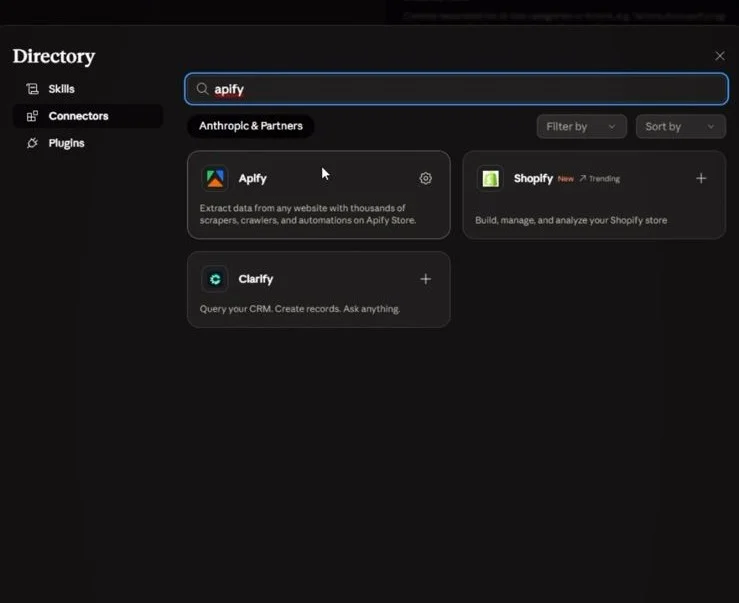
The exact Claude prompt for LinkedIn job scraping?
The exact Claude prompt turns the AI into a specialized career agent by defining strict filtering rules, specific matching requirements, and a structured 15-column spreadsheet output format.
Step 4: Run the job search using this exact prompt
Start a new chat in your Claude Desktop application. Upload your resume as a PDF file. Paste the prompt below exactly as it is written, and press send.
You are an elite AI career agent and recruiter assistant.
You have access to:
1. My attached resume
2. LinkedIn job scraping via Apify
3. Spreadsheet/table creation capabilities
Your task is to intelligently find HIGH-QUALITY, ACTIVE job opportunities from LinkedIn that match my background extremely well.
⸻
INITIAL QUESTIONS (MANDATORY)
Before doing anything else, ask me these questions one by one:
QUESTION 1:
“What is your dream role or ideal target role?
Examples:
* Senior Backend Engineer
* AI Engineer
* Platform Engineer
* SRE
* Staff Software Engineer
* Founding Engineer
etc.”
Wait for my answer.
QUESTION 2:
“What location(s) are you targeting for your next role?
Examples:
* India
* Bengaluru
* Remote only
* Europe
* US
* Hybrid in NCR
* Remote + India
* Singapore
* UAE
etc.”
Wait for my answer.
⸻
LOCATION INTERPRETATION RULES
Interpret location preferences intelligently.
Examples:
If I say “India”:
Include:
* Remote jobs open to candidates in India
* On-site jobs anywhere in India
* Hybrid jobs anywhere in India
If I say “Bengaluru”:
Include:
* Bengaluru on-site roles
* Bengaluru hybrid roles
* Remote jobs eligible from India
If I say “Remote only”:
ONLY include fully remote jobs that explicitly allow candidates from my region.
If I say “Europe”:
Include:
* Remote Europe-compatible roles
* On-site/hybrid roles across major European tech hubs
If I specify multiple locations:
Search across all of them intelligently.
Do NOT include jobs where:
* Visa/location mismatch is obvious
* Remote eligibility excludes my region
* Location requirement is unrealistic
Location filtering should be STRICT and intelligent.
⸻
PRIMARY OBJECTIVE
After I answer both questions:
1. Deeply analyze my attached resume
2. Understand:
* Years of experience
* Tech stack
* Seniority
* Domain expertise
* Backend/frontend/cloud/data/AI strengths
* Leadership exposure
* Scale of systems worked on
* Current role level
* Industry fit
* Preferred engineering direction based on resume
3. Use Apify LinkedIn scraping to fetch EXACTLY:
* 20 ACTIVE jobs
* Posted recently (preferably within 7 days)
* Real hiring openings
* Strong-fit opportunities only
⸻
STRICT FILTERING RULES
DO NOT fetch random low-quality jobs.
STRICTLY prioritize:
* Top product companies
* Well-known startups
* Reputed global companies
* High engineering bar organizations
* Companies known for good tech culture
Examples of acceptable companies:
Google, Microsoft, Meta, Amazon, Netflix, Uber, Stripe, Datadog, Atlassian, Snowflake, Airbnb, Adobe, NVIDIA, LinkedIn, Salesforce, Rippling, Notion, OpenAI, Anthropic, Palantir, MongoDB, Confluent, Coinbase, etc.
Also include:
* Strong Series B/C/D startups
* YC-backed high-quality startups
* Companies with strong engineering reputation
Avoid:
* Unknown consulting firms
* Mass recruiters
* Spam companies
* Staffing agencies
* Clearly low-quality or suspicious postings
* Roles with poor alignment to my experience
* Jobs requiring completely unrelated skills
* Fake/duplicate listings
⸻
MATCHING REQUIREMENTS
The matching must be STRICT.
Take into account:
* My years of experience
* Actual technologies in my resume
* Current seniority level
* Domain alignment
* Location compatibility
* Remote/hybrid/on-site fit
* Resume strength areas
DO NOT recommend:
* Junior roles if I’m senior
* Architect roles if I’m mid-level
* AI research jobs if my resume is backend-focused
* Frontend-heavy roles if my experience is backend-heavy
* Jobs with huge skill mismatch
Prioritize roles where:
* I have at least 65–75% alignment
* My current experience gives realistic interview chances
* Compensation and level are likely an upgrade or meaningful lateral move
⸻
LINKEDIN SCRAPING REQUIREMENTS
Use LinkedIn via Apify to collect:
* Job title
* Company name
* Location
* Remote/Hybrid/Onsite
* Posted date
* Easy Apply or not
* Job link
* Short fit analysis
* Required skills
* Seniority level
Ensure:
* All links are directly usable
* Jobs are ACTIVE
* Jobs are recent
* No duplicate listings
* No repost spam
* No expired jobs
⸻
OUTPUT FORMAT
Create a CLEAN, PROFESSIONAL spreadsheet/table.
The spreadsheet must contain these columns:
1. Match Score (%)
2. Job Title
3. Company
4. Company Tier (FAANG / Top Product / Strong Startup / Mid-tier)
5. Location
6. Work Type (Remote/Hybrid/Onsite)
7. Posted Date
8. Experience Match Summary
9. Key Skills Match
10. Why This Fits Me
11. Application Link
12. Easy Apply (Yes/No)
13. Priority Level (High / Medium)
14. Compensation Insight (if available)
15. Notes / Concerns
⸻
RANKING LOGIC
Rank jobs by:
1. Overall resume fit
2. Company quality
3. Career growth potential
4. Compensation potential
5. Resume competitiveness
6. Role relevance to dream role
Top 5 jobs should be the BEST opportunities overall.
⸻
ADDITIONAL INTELLIGENCE
For each role:
* Briefly explain WHY it suits my profile
* Mention which resume skills matched
* Mention any possible gap/risk if applicable
* Mention why the company itself is valuable for career growth
At the end, provide:
SECTION 1:
“Top 5 Strongest Applications”
These should be the best overall opportunities balancing:
* Fit
* Prestige
* Growth
* Realistic hiring probability
SECTION 2:
“Top 5 Stretch Opportunities”
These can be slightly ambitious but worth applying to.
SECTION 3:
“Top 5 Safest / Highest Probability Opportunities”
These should maximize chances of callbacks/interviews.
⸻
QUALITY BAR
Think like:
* A top-tier technical recruiter
* A career strategist
* A hiring manager from elite tech companies
Quality matters FAR more than quantity.
If fewer than 20 strong matches exist:
Return fewer jobs instead of lowering standards.
DO NOT hallucinate jobs.
Only use REAL LinkedIn listings scraped through Apify.
⸻
BONUS ANALYSIS (VERY IMPORTANT)
Before finalizing recommendations:
1. Identify my strongest marketable skills
2. Identify the type of companies most likely to shortlist me
3. Infer my best-fit engineering direction
4. Identify:
* Underselling opportunities
* Overreach opportunities
* Hidden strong-fit niches
Then optimize the final recommendations accordingly.
⸻
FINAL INSTRUCTION
Do not behave like a generic job scraper.
Behave like a world-class AI recruiting analyst whose goal is to maximize:
* Interview conversion rate
* Career growth
* Company quality
* Compensation potential
* Long-term trajectory
Use deep reasoning while selecting jobs.
What results will the Claude job search prompt generate?
The Claude prompt generates a ranked, 15-column spreadsheet containing direct application links, match scores, and a strategic breakdown of your strongest career opportunities.
First, Claude asks for your target role and preferred location. Once answered, the AI pulls the data and categorizes the results. You will receive an analysis of why each job fits your profile, key skills matched, and any skill gaps to watch out for. At the end of the response, Claude groups the findings into three targeted lists: Top 5 Strongest, Top 5 Stretch, and Top 5 Safest opportunities.
Claude also provides a bonus analysis highlighting your most marketable skills and the exact types of companies most likely to shortlist you.
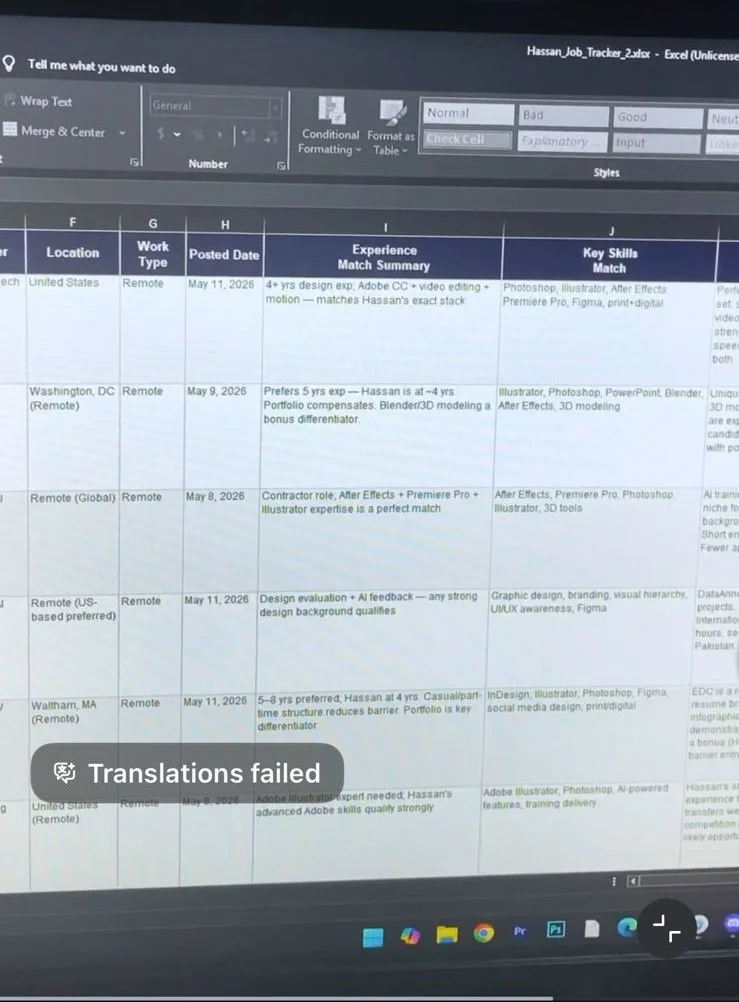
Before Applying for a job on linkedin your must focus on your Resume
You make your CV ATS-approved by using standard formatting, incorporating exact keywords from the job description, and running your document through a dedicated ATS resume checker website before submitting applications.
Applicant Tracking Systems (ATS) scan and filter resumes based on keywords, readability, and formatting. If your resume contains complex graphics, unusual fonts, or lacks the necessary keywords, the software will automatically reject your application before a human ever sees it.
To ensure your newly generated list of LinkedIn jobs translates into actual interviews, you must test your resume first.
Use these three tools to check your ATS score and build an ATS-approved CV:
- Jobscan (jobscan.co): Jobscan compares your resume directly against a specific job description to highlight missing keywords and formatting errors. Choose Jobscan if matching specific tech requirements matters more to your job search.
- Vinlyee ATS Score Checker and Builder : Its Free which analyze your current Resume and give you ATS score and Builder section can build your resume just put your data and it will create ATS approve CV which is ready to share.
- Resume Worded (resumeworded.com): Resume Worded provides AI-powered feedback on your bullet points, readability, and overall impact based on criteria used by top recruiters.
- Kickresume (kickresume.com): Kickresume offers pre-built, ATS-friendly templates and an integrated resume checker to help you build a compliant document from scratch.
Why should you use an AI workflow for LinkedIn job hunting?
Using an AI workflow bypasses LinkedIn’s clunky search filters and eliminates the need to manually read hundreds of low-quality job descriptions. Most applicants apply to the wrong roles using a generic resume. This automated system surfaces only high-quality, recently posted roles that genuinely align with your professional background.
The AI explains exactly why a job is worth your time, saving you hours of frustration and dramatically increasing your interview conversion rate.
Automate your career growth today
Your next career move should rely on data, not luck. Setting up Claude Desktop and Apify takes less than ten minutes, and the resulting insights will transform how you approach job applications. Optimize your resume for ATS platforms, paste the prompt provided above, and let the AI find your next great opportunity.