
Online File Converter Privacy: What GDPR Says Before You Upload Your CV or Photos
A Proton survey of 3,000 people across the UK, France, and Germany, published this June, found that 45% would actively avoid a company once they learned it stored data on US servers, and four in five now weigh “where does my data actually go” before doing business with anyone online. Yet most of us still type “convert PDF to Word” into Google, click the first result, and drag in a file without a second thought.
That gap is exactly why online file converter privacy deserves a closer look. Every tool we’ve built at Vinlyee Pro exists to answer one question before anything else: does this file actually need to leave your device? Most of the time it doesn’t — and for something like a CV, a scanned ID, or a folder of personal photos, that distinction matters more than people realize. Here’s what’s actually happening when you hit “upload,” what the General Data Protection Regulation (GDPR) has to say about it, and how to get the same result without the gamble.
What Actually Happens When You “Just Upload” a File
A typical online converter works the same way regardless of brand: your file leaves your device, travels to a server somewhere, gets processed, and a result comes back. That server belongs to someone — sometimes the company whose name is on the site, often a cloud subcontractor in a country its privacy policy never names.
Read the fine print on even a well-known converter and you’ll sometimes find an admission buried in it. Convertio’s own privacy policy states plainly that it becomes a “data controller” the moment you upload a file containing personal information. That’s not a knock on Convertio specifically — it’s an honest description of how the entire category works. Once a file is on someone else’s server, you’re relying on their word for what happens to it next.
Occasionally it’s worse than a vague policy. In March 2025, the FBI’s Denver field office issued a public warning that some free document-conversion sites were quietly inserting malware into the files they handed back, built to lift passwords, banking details, and crypto wallet credentials from whoever opened the result. You don’t need to assume bad intent from every converter to take the underlying point seriously: once a file leaves your device, you can’t get that decision back.
Where GDPR Actually Fits In
GDPR defines personal data broadly: anything that can identify a living person, directly or indirectly. A name, a signature, an address, an employment history, a face in a photo, even a device identifier all qualify. A CV ticks nearly every box on that list by design. So does a scanned ID, a signed contract, or a phone photo taken with location services switched on.
The moment one of those files reaches a converter’s server, that site is processing personal data under GDPR, whether its homepage mentions the regulation or not. If the server sits outside the EU or EEA, the file has just made an international data transfer — a category that’s been genuinely unsettled since the 2020 Schrems II ruling struck down the EU–US Privacy Shield and left companies patching together case-by-case safeguards instead of one blanket agreement.
None of this means every online converter is breaking the law. It means the free, thirty-second option usually comes with a data trail that even the company running it can’t fully account for, since plenty lean on third-party cloud infrastructure spread across several countries. That’s hard for any user to audit — and easy to sidestep entirely.
The Privacy Risk Almost Nobody Thinks About: Metadata
Even a “harmless” photo carries more than its pixels. Modern phones embed EXIF data into every shot — GPS coordinates accurate to a few metres, a timestamp, and the device model. Under GDPR, that GPS tag alone counts as personal data, the same legal category as a name or email address, because it can locate a specific person.
Documents carry their own version of this. A Word file or PDF often keeps the author’s real name, computer name, and edit history embedded long after that text has been deleted from the visible page.
You can strip a photo’s location data yourself before sharing it: on Windows, right-click the file, open Properties, go to Details, and choose “Remove Properties and Personal Information.” On an iPhone, go to Settings → Privacy & Security → Location Services → Camera and switch it to Never for future shots. But if the tool doing your compressing or converting never reads the file on a server in the first place, that metadata never left your machine to be a question at all — which is how our image compressor and image converter are built.
How Browser-Based Tools Sidestep the Problem Entirely
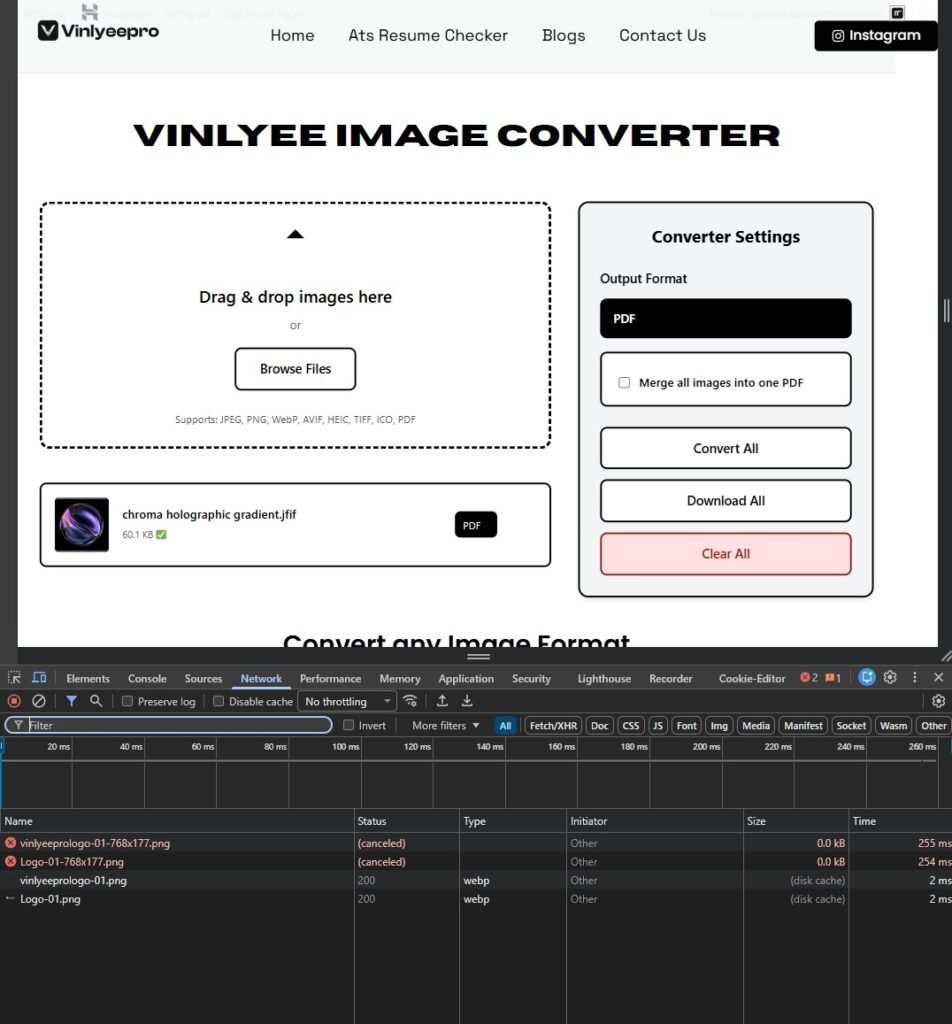
A genuinely client-side tool doesn’t send your file anywhere. It uses your browser’s own JavaScript and WebAssembly engine to do the actual work — reading the file, redrawing it, compressing it — inside the tab already open on your screen. The only thing that travels over the network is the webpage loading; your file never does.
You can test this yourself in about ten seconds: open a browser-based tool, switch your device to airplane mode, and try converting a file anyway. If it still works, nothing left your device, because it physically couldn’t have. That’s the premise behind every tool on this site, laid out plainly in our privacy policy: no accounts, no uploads, no server that ever sees your file.
- Does the privacy policy explain what happens to your file in plain language, not just “we take security seriously”?
- Does it say processing happens on your device, or does it just promise to delete files later — a promise you have no way to verify?
- Is the connection HTTPS? Non-negotiable minimum, no exceptions.
- If you’re comfortable with browser tools, press F12, open the Network tab, then upload. If your filename appears in an outgoing request, it left your device; if nothing shows once the result appears, it didn’t.
- Would you attach this exact file to an email and send it to a stranger? If not, don’t hand it to a converter you haven’t checked first.
Matching the Right Tool to the File
A CV is a personal-data document by definition — name, address, and career history in one place. Run it through our ATS resume checker and it’s scored and rebuilt entirely in your browser, so the exact document you’re trying to get past a hiring algorithm never has to pass through someone else’s server first.
Scanned contracts, signed forms, or ID pages are better handled the same way — split or merge them and shrink the file size without a round trip to a stranger’s infrastructure. For photos going into a portfolio, a marketplace listing, or a job application, resize them the same local way before you send them anywhere.
Quick Answers
Does GDPR apply to a casual photo, or only formal documents?
Any photo with identifiable information counts — a face, a GPS tag, even a car number plate — regardless of how casual it feels.
Are all online converters unsafe?
No. Plenty are entirely legitimate, especially ones with specific, clearly worded retention policies. The catch is that you usually can’t verify those claims yourself — which is exactly the gap a browser-based tool removes, since there’s nothing to verify when nothing was ever sent.
Is a browser-based tool automatically "GDPR compliant"?
If a tool never transmits or stores your file, there’s no processing for GDPR’s rules to apply to in the first place. That’s a strong practical safeguard, not a substitute for legal advice if you’re handling other people’s data professionally.
Is a browser-based tool automatically "GDPR compliant"?
If a tool never transmits or stores your file, there’s no processing for GDPR’s rules to apply to in the first place. That’s a strong practical safeguard, not a substitute for legal advice if you’re handling other people’s data professionally.
Next time a form, a job application, or your own memory needs a file converted, compressed, or checked, it’s worth asking the same question we ask before building anything: does this actually need to leave my device? Usually, it doesn’t.