
If you need to merge PDF files without uploading them anywhere, you’re asking the right question. Most “free” PDF mergers send your documents to someone else’s server first. That’s fine for a flyer. It’s a bad idea for a tax return, a signed contract or a scan of your ID. Below is how upload-based tools handle your files, how browser-based merging avoids the problem, and a 30-second test you can run yourself.
What happens to your file on a typical online PDF merger
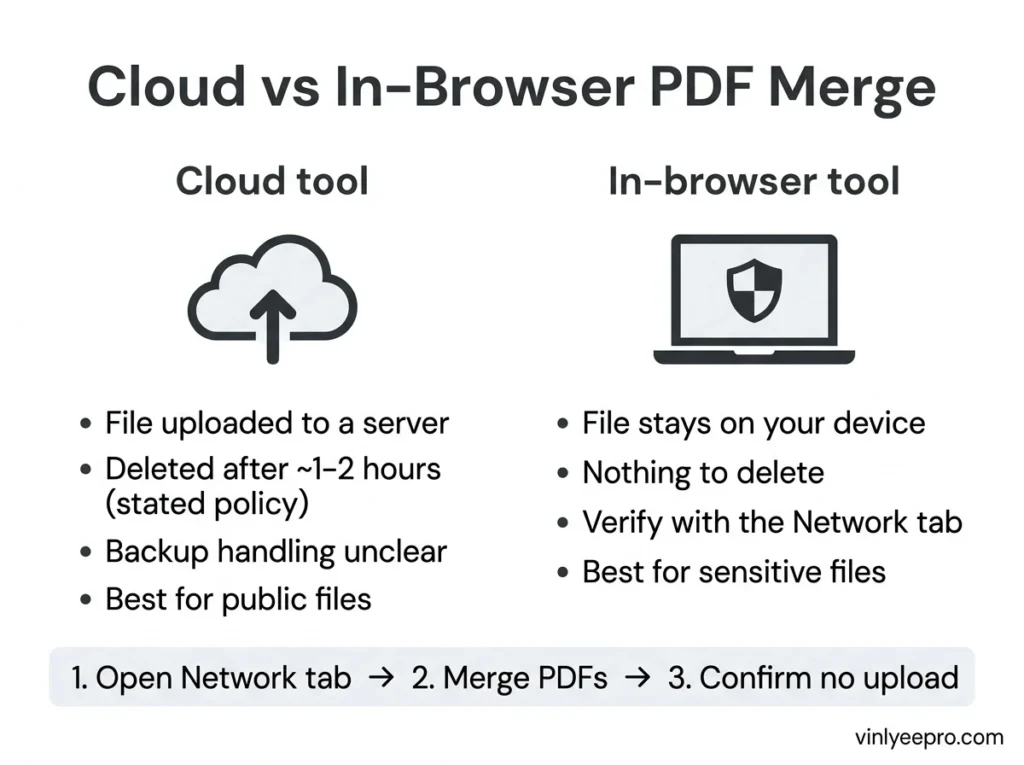
With a standard tool, your file travels to a remote server, gets merged there, and comes back as a download. The big names do publish deletion policies. iLovePDF says uploaded documents are automatically deleted within a two-hour window. Smallpdf says files from most tools are deleted within one hour of processing.
Those are reasonable policies, but they’re promises rather than something you can check. One privacy review points out that a stated policy is not a technical guarantee, so you’re trusting the company to delete as described. The same review notes that backup retention varies by provider and usually isn’t spelled out in consumer-facing policies.
When uploading is fine, and when it isn’t
I don’t think every merge needs to be paranoid. Upload-based merging is fine for public or replaceable files, and a poor default for anything confidential, regulated, signed or client-facing. A restaurant menu or a class handout is fine. Bank statements, medical paperwork, and job or visa applications are not.
There’s also a compliance angle if you handle other people’s data at work. One privacy guide lists Social Security numbers, account numbers and complete financial pictures as content you shouldn’t push through a free upload service. It also flags that under GDPR, using a third-party processor can require a signed data processing agreement, which free consumer tools don’t offer. If that applies to your job in the US, UK or Canada, check with whoever handles compliance. This post isn’t legal advice.
How in-browser merging works
Browser-based tools skip the upload step. The browser’s File API reads the file bytes from your device straight into browser memory. The merge happens there, and the finished file is handed back as a download. As one guide puts it, a tool that runs entirely in your browser with no upload is as safe as running a desktop app.
The trade-off is speed on huge files. Files of hundreds of megabytes can be slower than a dedicated desktop app, because your browser is limited by your computer’s memory. For everyday documents, you won’t notice.
The 30-second privacy test (don’t take anyone’s word for it)
Any site can claim “your files never leave your device.” Check it:
- Open the merge tool, then press F12 (Cmd+Option+I on Mac) and click the Network tab.
- Clear the log, then add two PDFs and click merge.
- Watch the list. A truly local tool shows no upload request carrying your file. An upload-based tool shows a large POST request.
How to merge PDFs without uploading, step by step
- Open the Vinlyee Pro Merge and Split PDF tool.
- Drag your PDFs in, or click to browse.
- Reorder files in the workspace so pages come out in the sequence you want.
- Click merge and download the combined file.
There’s no sign-up, no file limit and no subscription. Check the finished file’s page order before you send it anywhere.
Mistakes that waste time
- Password-protected PDFs. Encrypted PDFs can’t be parsed until they’re decrypted. Open the file in your normal viewer and use Print to PDF to make an unlocked copy first. secureonlinetools
- Oversized photos. Application portals often cap uploads at a few MB. Shrink images first with the Photo Resizer, which also runs in your browser, then convert and merge.
- Wrong order. Merge once, check the pages, and only then send. Re-merging a bad file is easy, but recalling an emailed one isn’t.
FAQ
Yes. Use a browser-based tool that processes files locally, and confirm it with the Network-tab test above.
It depends on the file. Upload-based tools are fine for non-sensitive documents. For anything confidential, a local in-browser tool removes the upload step and the risk that comes with it.
No. Merging combines the existing pages without re-rendering them.
Do I need to install software?
No. It runs in Chrome, Edge, Safari or Firefox.
To merge PDF files without uploading them, use a tool that runs in your browser and verify it yourself. It takes 30 seconds and settles the question. Try the free PDF merger on your next document, and browse the other free browser-based tools on Vinlyee Pro.