
It’s a familiar moment: a PDF needs merging, a photo needs resizing, or a scanned ID has to become a JPG, and it’s 11pm on a Sunday. You search “free file converter,” click the first result, and drag your file in without reading a word of the privacy policy. Most of the time, nothing goes wrong. But “most of the time” isn’t really the bar GDPR sets — and if you’re based in the EU, work with EU clients, or just handle files with real people’s names on them (CVs, contracts, signed forms), whether that converter is actually GDPR-compliant is a fair question that almost nobody stops to ask.
What GDPR Actually Requires From a File Converter
The moment a file containing personal data — a name, an email address, a signature, a photo of someone’s face — leaves your device and lands on someone else’s server, you’ve created what GDPR calls a processing relationship. Article 28 is specific about this: any processor handling personal data on your behalf is supposed to do so under a written contract, a Data Processing Agreement. Most free converters don’t offer one, mainly because most weren’t built with freelancers handling client contracts or HR teams reviewing CVs in mind at all.
Then there’s Article 5(1)(c), the data-minimization principle: personal data shouldn’t be kept around longer than the task actually needs. A file conversion takes seconds. A service that quietly holds your upload for 24 hours “for quality assurance” is already on shaky ground.
Cross-border transfers add another layer most people never check. Servers inside the EU or EEA are fine. Servers in the UK are covered by the UK’s own adequacy decision. Servers in the US are the tricky case: after the 2020 Schrems II ruling struck down the old EU-US Privacy Shield, transferring data there needed Standard Contractual Clauses or, since 2023, certification under the newer EU-US Data Privacy Framework. Plenty of well-known “free” tools never say which of these applies to them — and that silence is itself worth noticing.
Enforcement isn’t hypothetical, either: data protection authorities across the EU have fined organisations, small businesses included, for exactly this kind of missing paperwork, sometimes with nothing ever actually leaked. The contract simply didn’t exist, and that alone was the violation.
The Risk Nobody Mentions: It’s Not Only a Privacy Problem
Compliance aside, there’s a more immediate danger. In 2025, the FBI specifically warned about fake file-converter sites that use the “conversion” itself as a delivery method for malware. One strain, known as Gootloader, turned up hidden inside converter downloads — and once it’s on a device, it goes looking for banking logins, ID numbers, and even cryptocurrency wallet keys. A slick interface or a #1 Google ranking doesn’t rule this out; some of the sites named in these warnings had millions of monthly visitors.
The privacy side is just as concrete, not theoretical. In 2024, a Cybernews investigation found that two separate online PDF platforms had left thousands of user-uploaded documents — passports, driver’s licences, signed contracts — sitting exposed on misconfigured servers. Nobody had to get “hacked” in a dramatic sense. Someone just forgot to lock a door, and every file that had ever been uploaded was sitting behind it.
A Short Checklist Before You Upload Anything
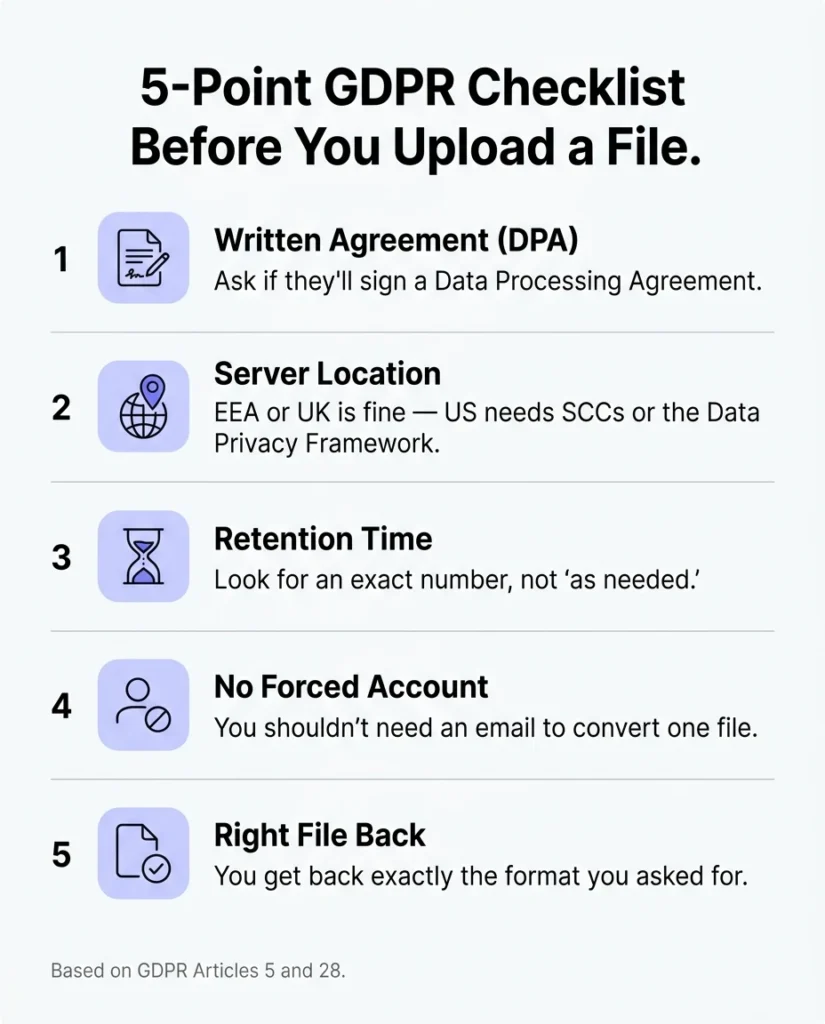
None of this means every converter is dangerous — it means “free” and “fast” aren’t the only things worth checking first. Before uploading a file with a real person’s details in it anywhere, run through a few quick questions:
- Does the service publish a Data Processing Agreement, or do you have to email sales just to find out one exists?
- Do they say exactly where the processing servers sit, or only where the company is “headquartered”?
- Is the retention period a specific number (“deleted within 60 minutes”) or a vague phrase like “as needed”?
- Are you forced to create an account and hand over an email address just to convert one file?
- Does the download come back as the file type you actually asked for — not a surprise .zip or .exe?
If a service can’t answer the first two questions clearly on its own site, that’s usually the answer.
Or Skip the Upload Step Entirely
The simplest way to clear every item on that list at once is to use a tool that never receives your file to begin with. That’s what “client-side” or “browser-based” processing means in practice: the conversion runs inside your own browser, using your own device’s processing power, and the file itself is never transmitted anywhere.
No server ever holds a copy, so there’s nothing to leak, nothing retained past a promised deadline, and nothing to hand over under a data request — because it was never there.
That’s the model behind our own PDF merge and split tool and photo resizer: both run entirely in your browser, so a contract or an ID photo never leaves your machine in the first place. It won’t cover every case — some genuinely large batch jobs or unusual formats still need server-side power — but for a PDF merge, a quick resize, or most of what people actually reach for a converter to do day to day, personal data doesn’t need to touch a third-party server at all.
Is it illegal to use a free file converter in the EU? No — but if the file contains personal data and the converter can’t offer a Data Processing Agreement or say where your data goes, you (or your employer) carry the compliance risk, not the tool.
Does GDPR apply to a freelancer working alone, not just companies? Yes. It applies to anyone processing personal data as part of professional activity, freelancers and sole traders included.
What’s the fastest way to check if a converter is GDPR-safe? Look for a public Data Processing Agreement and a stated server location before you upload anything. If you can’t find either in under a minute, that’s your answer.
Next time it’s 11pm and a file needs converting, it’s worth asking where it’s actually going — or picking a tool where that question never comes up. You can see the rest of our free, browser-based tools here.